
Table of Contents
Most ecommerce businesses that come to us already have a Merchant Center account. GMC’s primary use is for ads, after all — somebody set it up, Shopping campaigns are running, job done.
But there’s more money on the table - FREE MONEY. Google Shopping creates high purchase intent traffic by shoppers who are actively searching for your products. Any merchant is free to tap into it, so long as they provide the right product information in the right format.
Some of our clients come to us with stalled organic Shopping performance. Their products are invisible not because of product quality, but data quality.
The usual culprit is that their product feeds are poorly maintained. They’ve got years of layered feeds and data sources overriding each other, or incomplete feeds to begin with.
Getting your products into GMC can be as simple as throwing together a spreadsheet, or as complex as multi-layered data mapping at scale.
This article covers the right and wrong ways to approach it — and how to build feed architecture that doesn’t collapse under its own weight.
How to Get Your Products in Google Shopping
Once your GMC account is live, you need to get your product data into the system.
For small stores with up to a few dozen products, you can comfortably work only within the GMC editor.
But at scale, you have to work with product feeds.
A product feed is simply a table of data about your products — a spreadsheet with information. Each row represents a product. Each column represents an attribute like the product ID (always the first column) followed by title, price, URL, GTIN, etc.
Merchant Center offers multiple ways to create and submit a product feed.
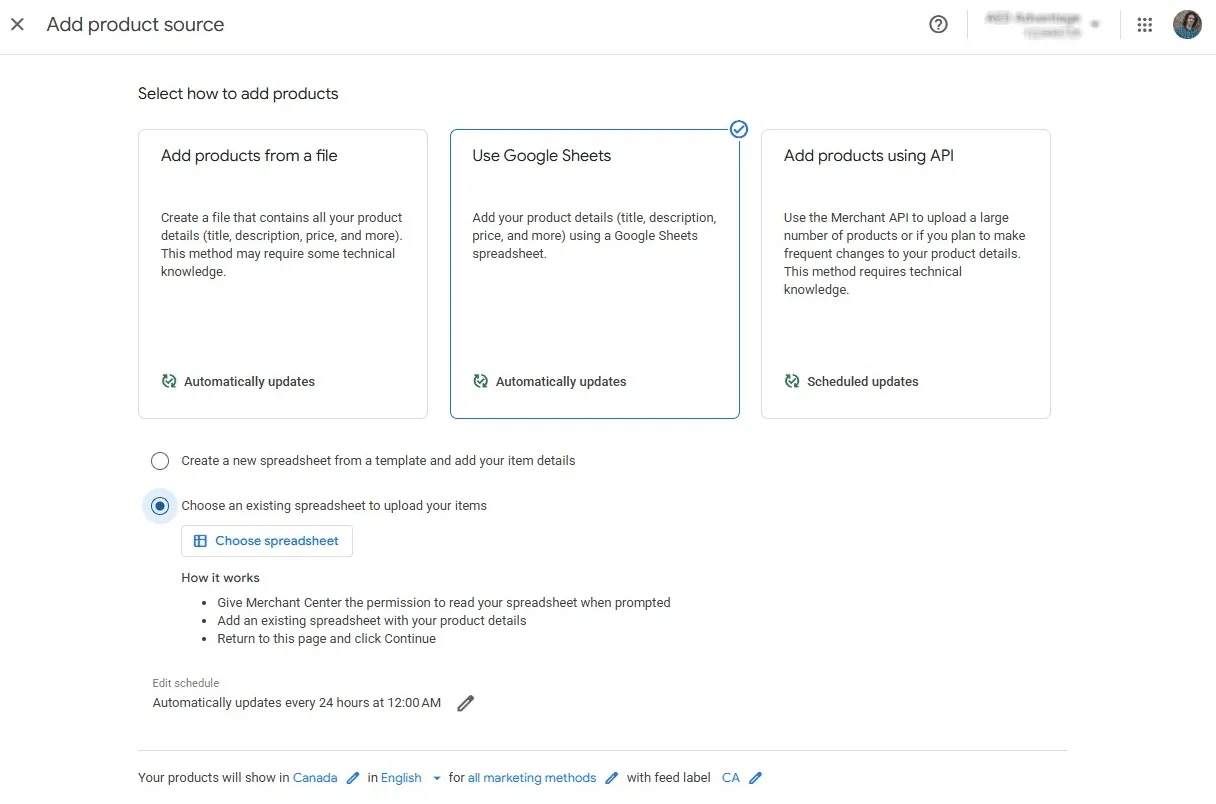
Spreadsheet uploads
Spreadsheet uploads work well for smaller stores. You manually create a CSV or Google Sheet with your product data and upload it to GMC. Simple and easy to get around up to a few hundred SKUs.
Third-party feed tools
Platforms like DataFeedWatch or Feedonomics sit between your ecommerce platform and GMC. They pull data from your store, let you transform and optimize it, then push clean feeds to GMC. This is my preferred approach for most established stores with thousands of products in their catalogue. You get flexibility without constant manual work.
API integrations
API integrations connect your Shopify or WooCommerce store directly to GMC, syncing product data in real time. This can work phenomenally if your store is set up with the exact attributes required for Shopping. Most stores aren’t however, which can lead to complicated workarounds to get the right data added.
Site crawls
GMC crawls your product pages and can use the structured data to generate a feed. This is only viable if your schema is pristine, and in my experience, it rarely is.
”Found by Google”
“Found by Google” means Google automatically creates listings for products it discovers on your site. You have no control over this, so it’s not recommended as a primary strategy, but it will fill gaps that you’ve missed in your other data sources.
Manual product entry
You can use the GMC’s editor to create and edit products in a UI environment. This works for a handful of products, but it doesn’t scale. Worse, manually created products can’t be bulk edited via feeds, so you’re stuck updating them one by one forever.
Manual products are easy to get into, but don’t scale. Spreadsheets scale but need proper maintenance. A third-party feed tool or a well-configured API integration can take care of the majority of data and keep it fresh, while supplemental feeds can fine tune the details.
Primary Feeds vs. Supplemental Feeds
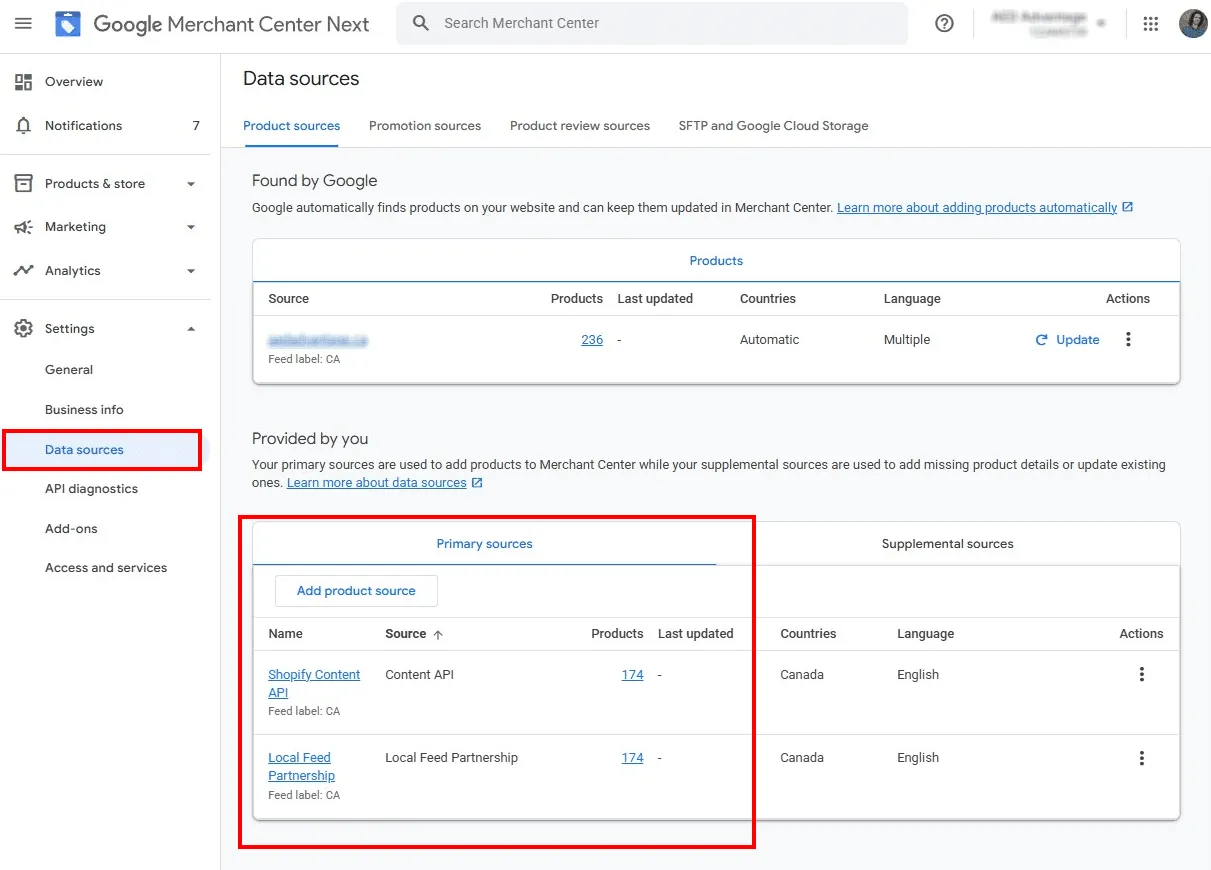
The above-mentioned product sources are all examples of primary feeds.
Primary feeds define your product catalog
Primary feeds are your source of truth. This is the main data that creates products in GMC. You can have multiple primary feeds (and often will), but each product should exist in only one primary feed.
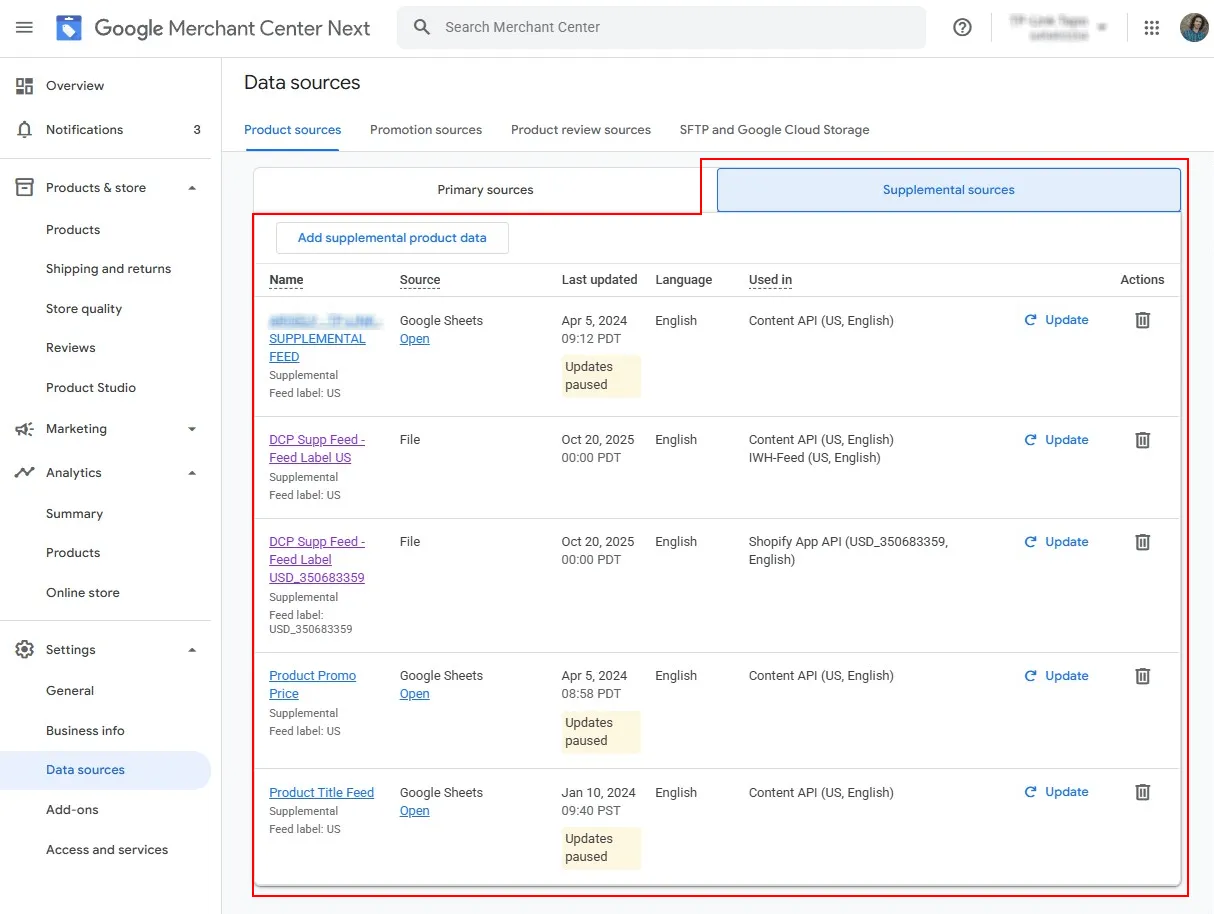
Supplemental feeds override or add data to existing products
Supplementary feeds can’t create new products; they can only modify products that already exist in a primary feed.
Each supplemental feed targets a single “Feed label” that corresponds to one primary feed. You can only modify products in that primary feed using their GMC IDs.
This matching system prevents data from getting scrambled across your catalog.
When supplemental feeds make sense
1. Temporary promotions. Running a holiday sale? Create a supplemental feed that overrides the sale price for specific products. When the sale ends, delete the feed. Your products revert to their original prices automatically. (Product page has to match the price)
2. Optimization testing. Want to test different attributes without touching your primary feed? A supplemental feed lets you experiment on specific product groups and measure the impact.
3. Access limitations. Sometimes you don’t control the primary feed. It’s auto-generated via API or managed by another team. Supplemental feeds give you an optimization layer without requiring access to the source.
I’ve used supplemental feeds to add missing attributes, override descriptions, and fix product URLs, all without touching the client’s core product data.
Keep Your Feed Structure Simple
Feed complexity builds gradually. A quick fix here, a new data source there, and suddenly your setup is harder to manage than it is to optimize.
I’ve worked with several GMC setups that started simple and became nightmares down the road.
A client came to us with product data flowing from four different sources:
- Manual products created in GMC’s editor
- Shopify Content API auto-syncing their catalog
- A spreadsheet-based primary feed for ad campaigns
- A second Shopify App API also pulling from the same store
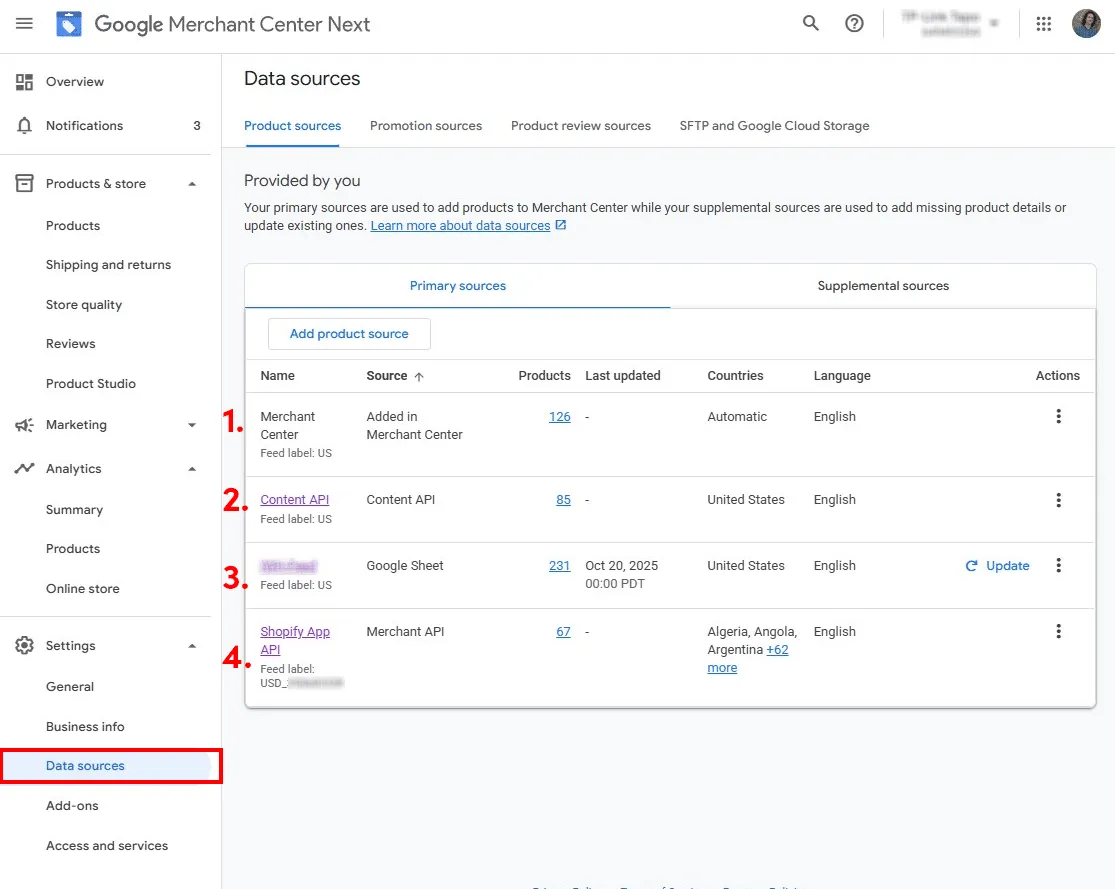
Why four sources for a store with just a few hundred products?
Each layer was added to solve a specific problem - a gap in the previous feed, a new product line, a marketing campaign. Nobody planned for this complexity. It just accumulated as the store developed and grew.
When we needed to update their GMC data, it became clear this wasn’t going to be as quick and easy as everybody thought.
- First, we had to reverse-engineer which products came from which source.
- Then, consolidate everything into a single database to map the changes we wanted to make.
- Finally, split our optimized data back into chunks matching each feed source.
We ended up with two supplemental feeds just to work within the existing primary sources. Even then, 80+ products could only be updated manually because they existed as standalone entries in GMC.
The project took 3X longer than it should have. Not because the optimization was complex, but because the GMC setup was a mess.
That second API integration that covers your missing products today becomes a maintenance burden next quarter. Those manual products you create “just for this campaign” become orphaned data you can’t bulk-edit later.
Start with the simplest system that works:
For most D2C stores, that means one primary feed plus supplemental feeds only when needed for optimization or temporary campaigns.
If you use a third-party tool to create and manage your feed (DataFeedWatch, Feedonomics, etc.), you don’t need the supplemental feed - everything can be run within the software.
If you’re already deep in feed chaos, consider a reset. Yes, it’s a project. But maintaining a convoluted system costs more in the long run: time, errors, missed opportunities, etc.
Your feed architecture should enable optimization, not prevent it.
Ensure Data Integrity at the Source
Poor data architecture doesn’t just make optimization harder; it caps your growth.
An apparel client came to us after hitting a wall with their Google Shopping performance. They’re a well-known brand that offers unique, high-quality products with exceptional reviews. So why weren’t they crushing it in Shopping?
Their product feeds were incomplete. Their Shopify store wasn’t set up with metafields for all the apparel-related attributes Google requires.
GMC requires additional attributes for apparel products like color, pattern, size, gender, etc., because clothing shopping is highly personalized to body characteristics and individual taste.
Of roughly 1,500 products, a third lacked critical attributes: color, pattern, material, or gender. As a consequence, their performance in Google Shopping had stalled.
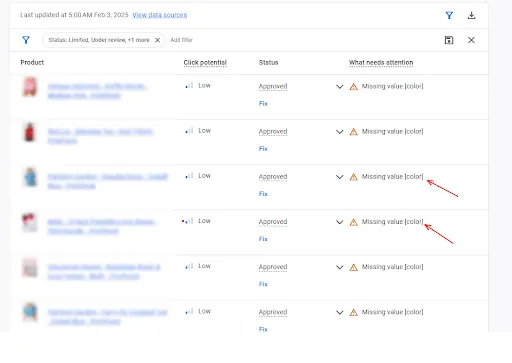
There’s no quick fix when your products lack the required data.
That’s where feed management software comes in. DataFeedWatch has expansive tools for data parsing, mapping, and conditional logic. We used these features to overhaul the client’s Google Shopping feed and fix all apparel-related attributes.
The one thing we had going for us was that the client used consistent Shopify product titles that contained the pattern name, product type, and color. After some data processing, we constructed reference tables for the attributes we wanted to map and stored them as variables.
We use conditional logic to assign these variables to specific GMC attributes.
Finally, we reconstructed optimized titles with all the key details properly arranged.
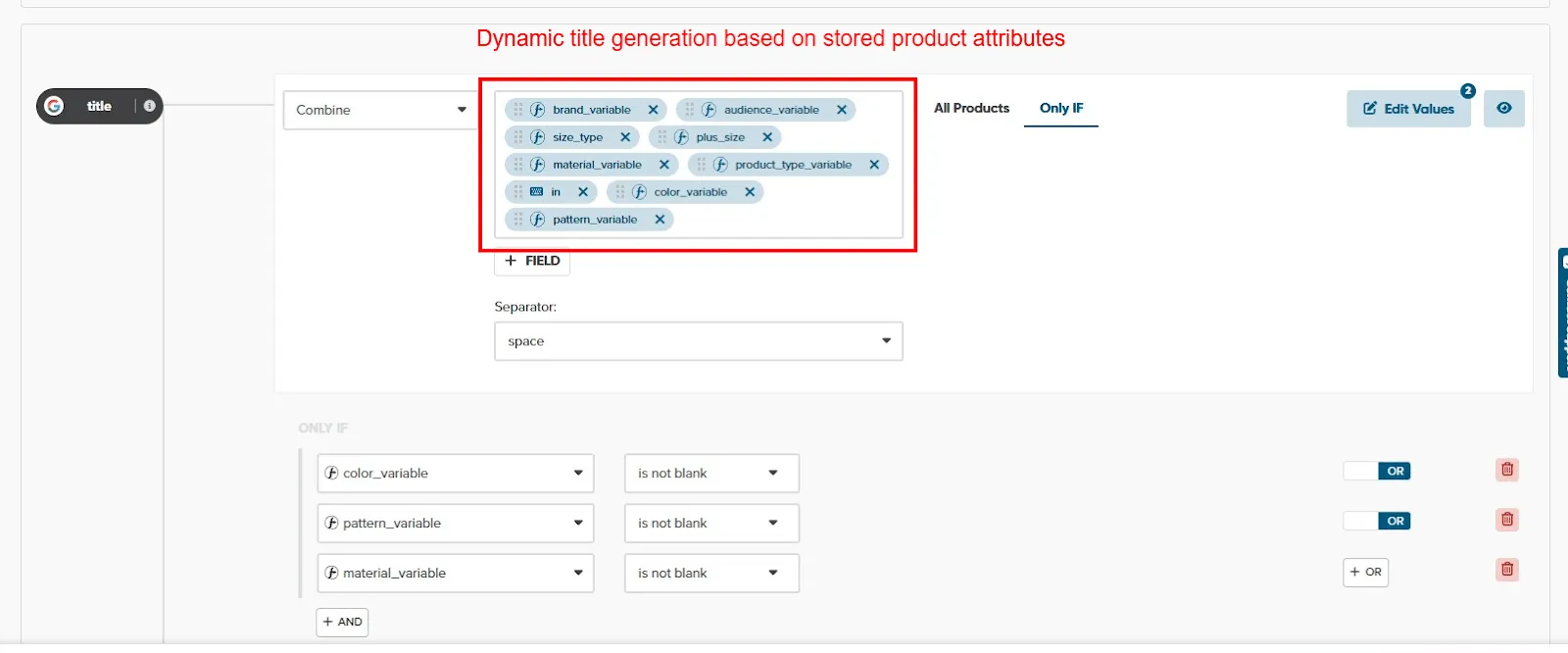
Sound convoluted? Yes, and it barely worked.
However, we delivered the client a 120% year-over-year improvement in Organic Shopping revenue.
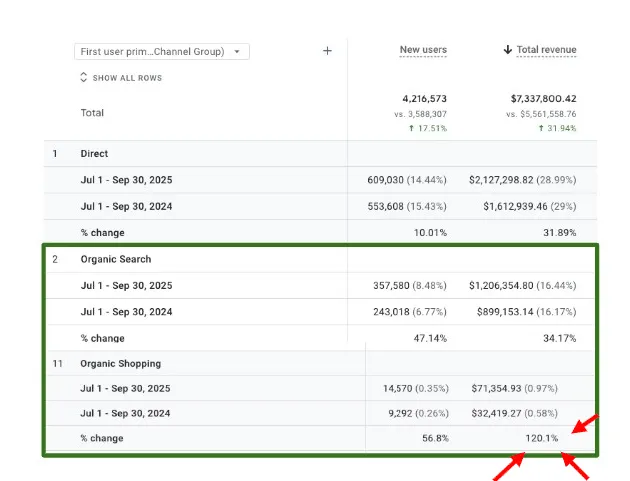
But not without a heavy maintenance burden:
- Those reference tables I’m so proud of need to be manually updated with every product launch to ensure new products have all the required data.
- And going through several layers of data processing naturally produces bugs, which we need to chase down and fix with rule exceptions and more data processing trickery.
At the same time, we’re working on a full-system overhaul to do what should have been done a thousand products ago, adding the necessary metafields to Shopify and building a clean feed system that doesn’t require text-parsing gymnastics.
If you’re launching a new store or migrating platforms, build the infrastructure correctly from day one. Make sure your ecommerce system can store and pass fields for every attribute GMC requires for your product category.
Yes, it takes upfront planning. Yes, it might require custom development. But it’s exponentially cheaper than retrofitting later when you have thousands of SKUs and years of messy data.
If you’re already struggling with poor data, you have two choices: live with limited optimization potential, or bite the bullet and fix the foundation. There’s no clever workaround that doesn’t eventually become a maintenance burden.
What Data to Include in Your Feed
A clean feed architecture is the pipeline for getting data between your store and Google.
But the attributes you send down the tube will determine if your products get approved, where they appear, and whether you get visibility on the searches buyers are having — and the AI conversations forming their decision matrix.
Part 3: The GMC Attributes That Actually Drive Shopping Visibility covers in depth all of the required attributes to get your products online, as well as proven guidelines for optimizing for visibility.