
Table of Contents
Everything I’ve covered so far — setting up Merchant Center, deciding on a feed format — has been laying the groundwork. Google Shopping optimization happens in the product attributes you add to your feed.
If Google disapproved a lot of your products, you likely failed to deliver all required attributes — GTIN, title, URL, product image, and so on. These attributes make or break your feed.
If your products are approved and live but you’re not getting visibility, the issue is usually that your attributes aren’t optimized to target your core categories. Title, description, product highlights, type, and category all determine how your products match up to relevant searches, even if the attributes themselves don’t appear on the listing.
AI search tools also use product data to match products to relevant queries. If your data is faulty or incomplete, they’ll recommend your competitors instead.
This article covers all of it: which attributes are required to get approved, which ones influence where you rank, and which ones determine whether AI search tools recommend you or skip you.
The Attributes That Get Your Products Listed
Let’s start with the must-haves.
The following fields are always required on all products and conditions for Google to accept your products and show them in Shopping.
Your product’s unique identifier within GMC. Use the product SKU or URL slug — something readable when you’re debugging feed issues at scale.
Displays in paid and free merchant listings. It can match your product page title, but doesn’t have to. Google will often rewrite it for free listings anyway.
Required but not displayed in the listing. Occasionally shown in the Knowledge Panel. If your product page has a clean 100–200-word description, reuse it here.
The product page URL — not a category or homepage. Google crawls this daily to verify your feed data matches the live page. Use the canonical version.
Clean product photos only. No logos, text overlays, promotional banners, or graphic design elements — Google will disapprove the latter.
Must match your live product page exactly. A mismatch gets your product disapproved. Additional attributes handle discounts, sales, and promotions.
In stock, out of stock, backorder, or preorder. If you mark something as available but it’s sold out, that’s a disapproval.
Does your product have a GTIN, MPN, UPC, EAN, JAN, or ISBN? Both TRUE and FALSE are valid — but you must explicitly specify one or the other.
Global Trade Item Number. If your product has a barcode, the GTIN is the number below the striped lines. Required for all mass-manufactured products.
Manufacturer Part Number. Sometimes the same as your SKU, sometimes not. If your product has one, list it correctly in GMC.
Beyond the core attributes, there are many more that are conditionally required, like:
New, refurbished, or used. Required if your product is used or refurbished.
The following are also required for apparel products and clothing:
The color should match your product page. If you use “Lavender Glaze” on your PDP, don’t submit “Purple”.
The size using your standard sizing convention — S/M/L/XL or numeric. Use size_type and size_system for additional context.
Male, female, or unisex. Determines which gender-specific searches your product matches in Shopping.
The primary fabric or material. Helps match searches like “cotton dress” or “leather jacket” where material is part of the query.
The pattern or graphic print — solid, striped, floral, or a pattern name like “Fancy Dogs.” Required when pattern is a defining product characteristic.
Newborn, infant, toddler, kids, or adult. Required for products designed for a specific age group.
Different countries have different regulations. In the EU, energy efficiency class is required for appliances and some electronics.
The good news? GMC flags attribute problems immediately in your dashboard.
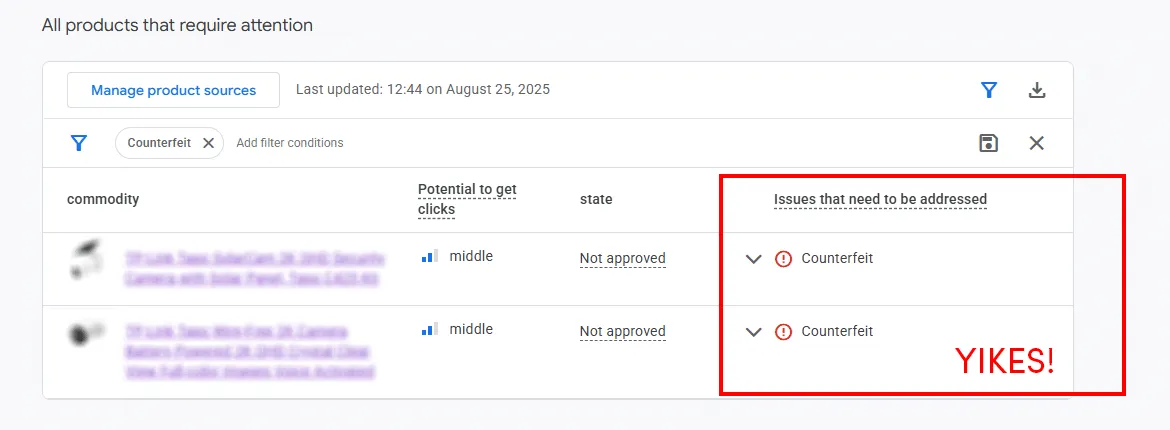
We accidentally added a few incorrect product descriptions in the feed. Google caught the discrepancy with the product page and disapproved a couple of products. We fixed it, and the products went online immediately.
Navigate to “Products” → “Needs attention” for a complete list of errors and fix suggestions.
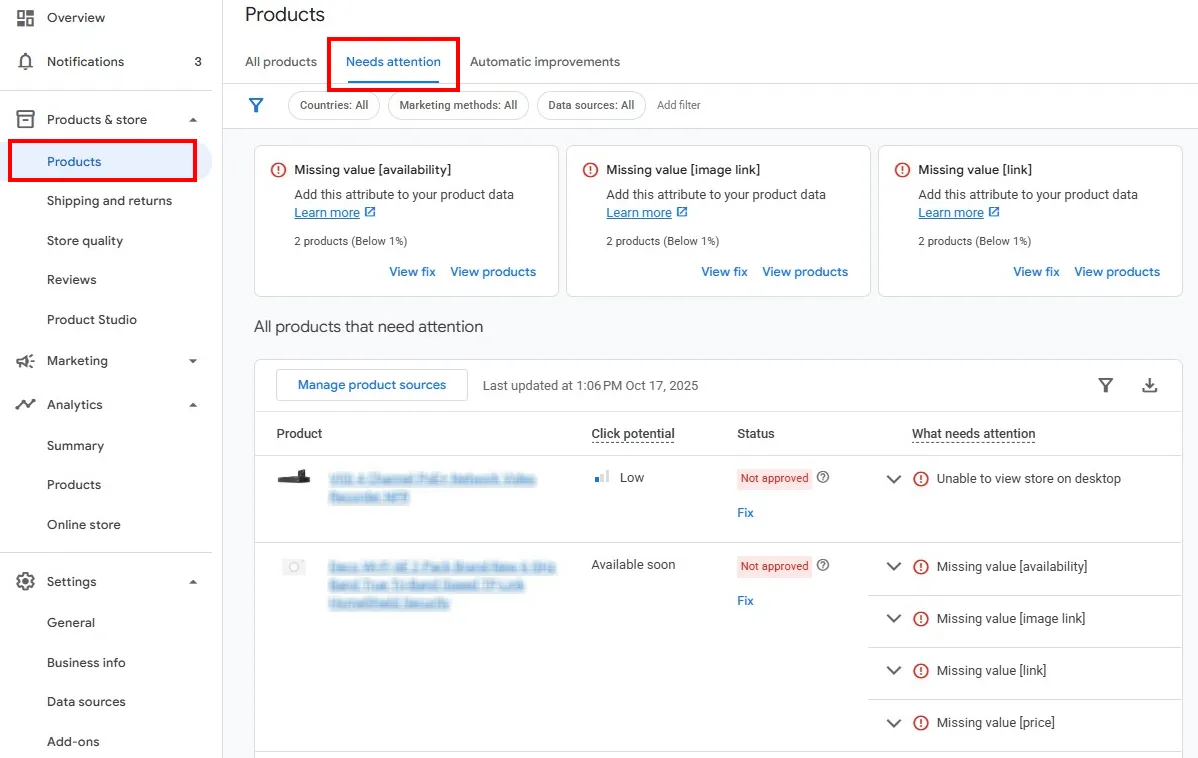
Once you resolve issues, products can reappear in Shopping as fast as a few minutes. Some flags require manual review, but that review happens within 24 hours of the request.
It’s not like getting banned by Panda, which sometimes meant starting a new website…or a new business.
Once your products are validated and appear in Shopping, the real optimization work begins. Meeting GMC’s requirements gets you in the game. How you structure your data determines whether you win.
The Attributes That Get Your Products Seen
Google Rewrites Product Titles for Free Listings
Google rewrites your product titles for free listings, and most merchants don’t realize it’s happening…and it’s not publicized at all.
I discovered this after optimizing a client’s titles according to best practices, then noticing the live Shopping results didn’t match exactly what we’d specified in GMC.
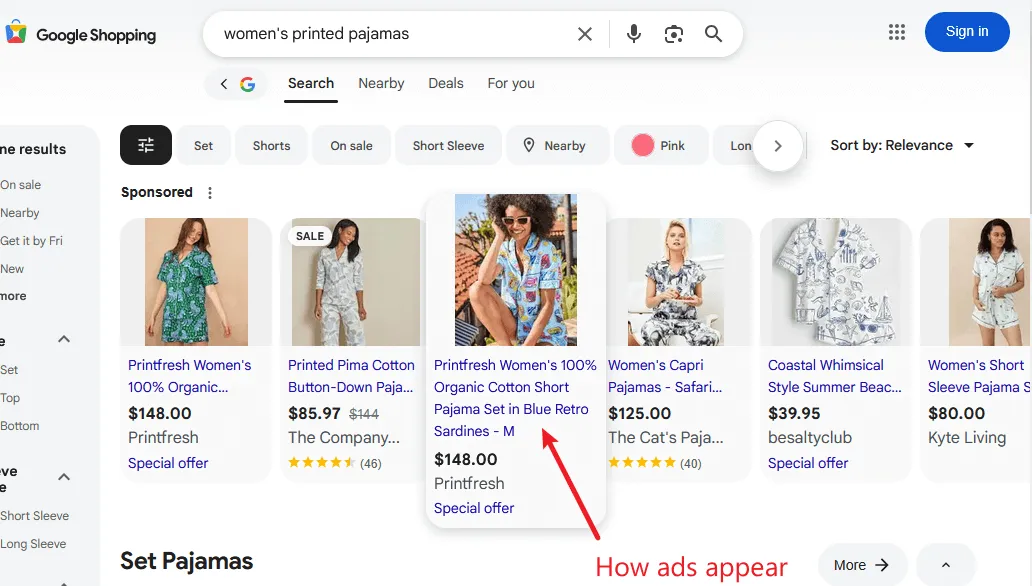
- Paid ads showed our exact titles.
- Free listings showed Google’s rewritten versions that were still accurate, but not the same.
Paid ads: Full title exactly as I specified in GMC - [Brand] + [Gender] + [Material] + [Product Type] in [Color] + [Print] - [Size]
Free listings: Google’s rewritten version - [Brand] + [Gender] + [Print] + [Product Type]
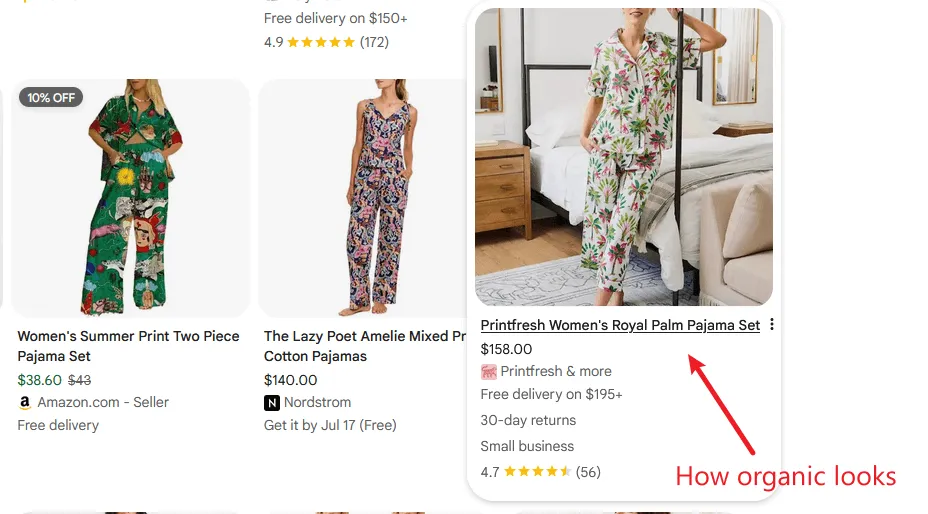
Google was actively rewriting titles for free listings, and in doing so, it dropped material, size, and color entirely. No warning. No documentation.
After going back and forth with Google Merchant Center support, I finally got confirmation of what was actually happening:
“This differentiation happens because Google uses algorithms and signals to group products together […] based on the unique product identifiers (GTIN, brand, MPN) you submitted. By grouping and displaying shopping results in a clean, organized manner, we ensure a better shopping experience for users.
The title, description, or image you submit through your Merchant Center feed may not be what shows live. Our system dynamically sources these assets from your feed and other trusted third parties to display product information that can generate the most traffic.
[…] This is intended behavior and opt-out requests may only be handled upon provision of strong business justification.”
- Google Merchant Center Support
This merchant produces unique, limited-series products. No GTINs. No other merchants sell the same items. Google still rewrote their titles.
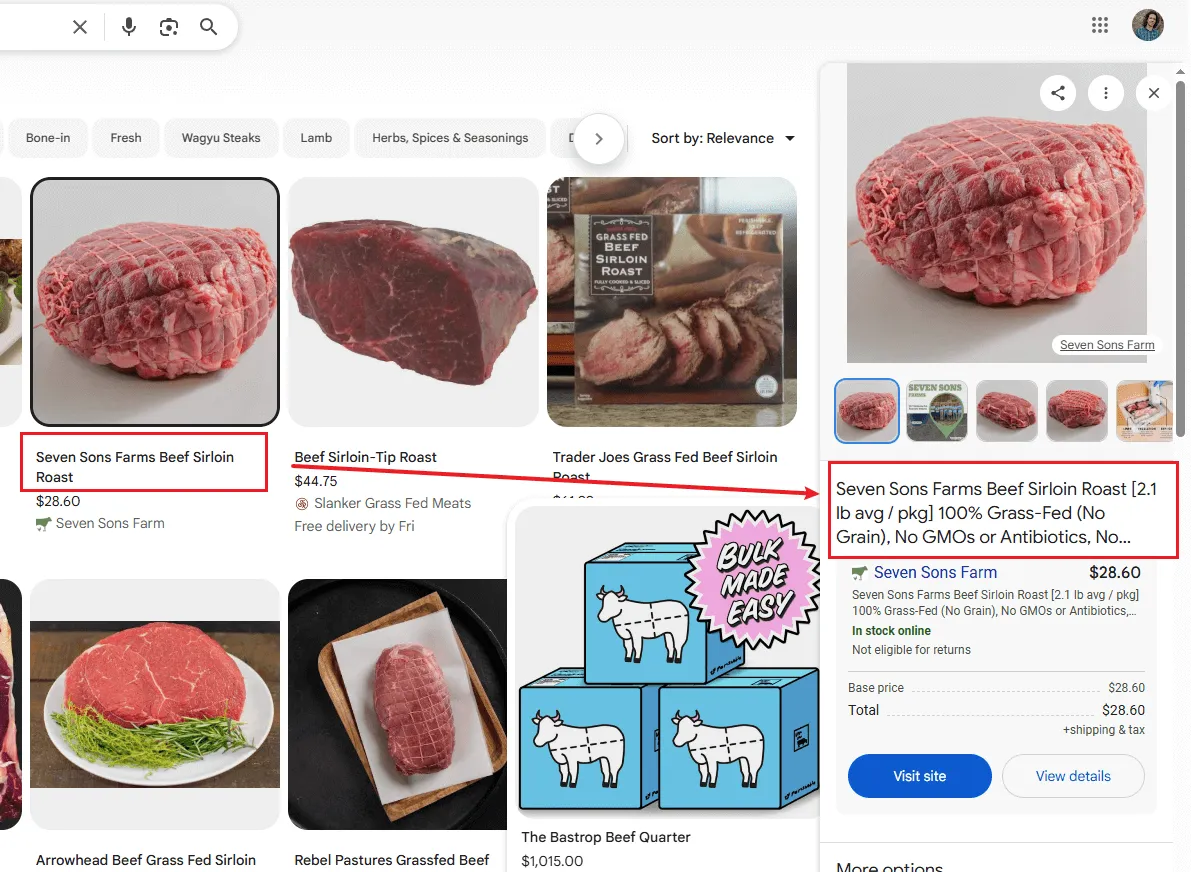
Here’s another example with a different store:
Paid ads: Full title with all product highlights - [Brand] + [Product type] + [Quantity] + [Product highlights 1 - 5]
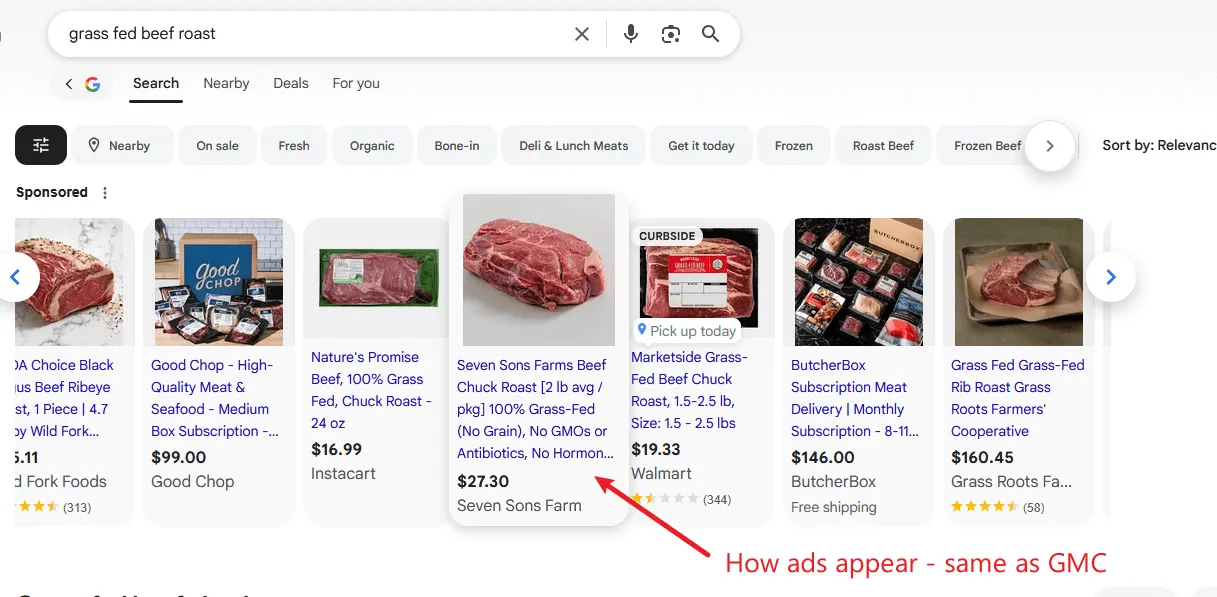
Free listings: Stripped down to essentials - [Brand] + [Product Type]
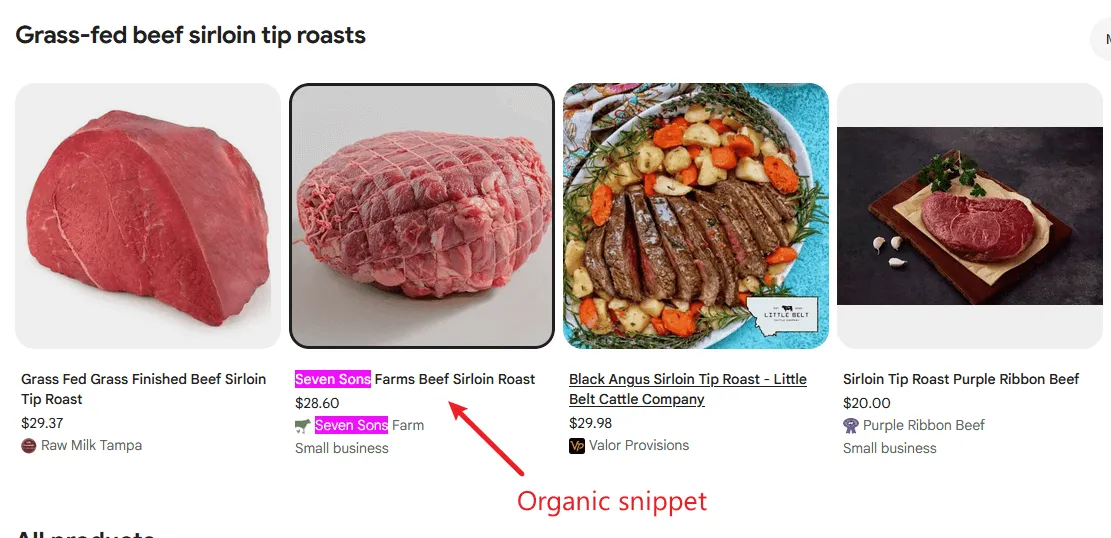
Patterns I’ve noticed across multiple clients:
- Google limits character length (unlike Amazon, where titles can be massive)
- Google strongly prefers [Brand] + [Product type] at the front
- Additional attributes get dropped or reordered based on what Google thinks is relevant
- The Knowledge Panel sometimes shows your exact title, sometimes it doesn’t
So, should you optimize your GMC titles?
Absolutely, but understand what you’re optimizing for.
Your title structure directly controls paid Shopping ads, where every character impacts conversion rates. For stores running Shopping campaigns, that’s reason enough to optimize aggressively.
For free listings, Google’s rewriting means you’re not optimizing for display, you’re optimizing the source material Google uses to create better titles. Well-structured input data gives Google’s algorithms more accurate information to work with, even when the final display differs from your specification.
My approach:
Start with [Brand] + [Product Type] - this aligns with Google’s preferred pattern and ensures your core product description stays intact even after rewriting.
Then add the most critical differentiating attributes: size, color, material, quantity – whatever your customers are searching for.
Focus on accuracy over keyword stuffing. Every attribute should describe the actual product. Google crawls your product page daily and will flag inconsistencies.
What to avoid:
- Marketing language, hype words, or calls to action (“Best,” “Free Shipping,” “Buy Now”): These get flagged and may trigger disapproval.
- Promotional information about sales or delivery: Use the dedicated sale price and shipping attributes instead.
- ALL CAPS or excessive punctuation.
- Generic keywords that don’t describe your specific product: They don’t help, just waste valuable space.
Description: Required But Rarely Displayed
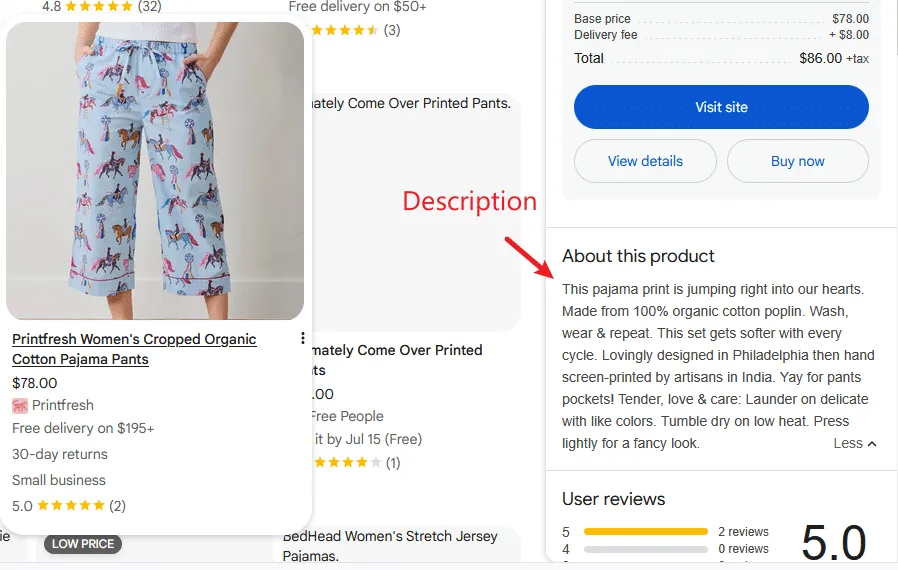
Product descriptions are mandatory in GMC, but they don’t appear in Merchant listings.
Google occasionally shows them in the Knowledge Panel after you click a product, but more often it pulls other content from your product page or generates its own summary.
My approach:
Reuse your product page description if it’s clean and factual. Aim for 100-200 words focusing purely on product features and specifications.
Skip the marketing copy. No “revolutionary,” “game-changing,” or persuasive language. Google wants product information, not sales pitches.
If your product pages have long-form marketing descriptions, create a condensed version for GMC that just covers:
- What the product is (include full product name)
- Key specifications or features
- Materials, dimensions, or technical details
- Who it’s designed for (if relevant)
Think of it as the description you’d read on the back of a product box: informative, not persuasive.
Should you spend hours perfecting descriptions? No. But treating them as throwaway content costs you opportunities. Create clean, factual product summaries that support your overall data quality - Google’s algorithms notice consistency across all attributes.
Product Highlights Are Free Optimization Opportunities
Product highlights are optional, unlike titles. Not required and often ignored.
Also, unlike titles, product highlights display exactly as you write them.
Google frequently shows highlights in the Knowledge Panel (though not always), and when they do, they’re prominent. Shoppers can quickly assess whether a product meets their needs.
You get up to 150 characters per highlight, and GMC accepts multiple highlights per product. Use this space strategically.
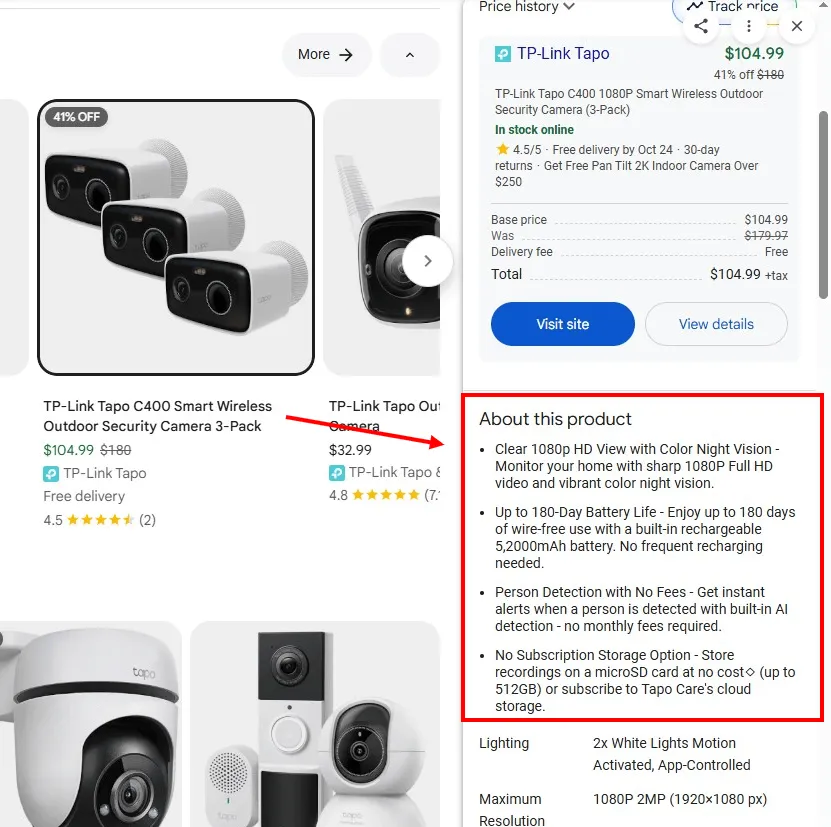
What makes an effective product highlight:
Focus on tangible product features and specifications, not marketing claims. “100% organic cotton” beats “incredibly soft material.”
Include measurements, quantities, or technical specs when relevant. “Serves 4-6 people” or “Fits screens up to 65 inches” gives shoppers concrete information.
Answer common purchase decision questions.
- For apparel: “Machine washable, tumble dry low.”
- For food: “Grass-fed, no antibiotics.”
- For electronics: “Compatible with iPhone 12 and newer.”
Be specific about what makes your product different.
What to avoid:
- Generic benefits that apply to everything you sell. “High quality” or “Great value” waste space and don’t differentiate.
- Marketing language that belongs in ad copy. Save “Limited time offer” for your actual ads.
- Information that’s already in your title. Don’t repeat “Women’s floral pajama set” as a highlight when it’s already the product name.
Product highlights help shoppers decide if this product fits their needs. The good ones provide verifiable information that highlights what makes your product different. The weak ones could describe any product from any vendor.
If you’re unsure what to highlight, look at your product page reviews. What do customers mention most? What questions come up repeatedly? Those are your highlights.
Google Product Category
The Google Product Category field is optional. Google will automatically assign a product category if none is selected, but I recommend not leaving it empty.
Google Product Category isn’t displayed anywhere shoppers can see, but it’s critical for getting your products in front of the right searches.
This attribute helps Google understand what your product is at a categorical level, which influences which searches trigger your listings. Even if the exact keywords don’t match, proper categorization helps Google connect your product to relevant searches.
However, you can only select from Google’s predefined taxonomy list. Link here.
If you don’t find your specific product in the list (which is very likely), just pick a broader, more generic category.
Example:
If you sell hand-poured soy candles, you won’t find “hand-poured soy candles” as an option.
You’d select “Home & Garden > Decor > Home Fragrances > Candles” and that’s specific enough.
You can’t create custom categories - that’s what the product type attribute is for.
Product Type
Product type is also an optional field, but you don’t want to skip it.
Unlike Google Product Category, Product Type is freeform. You can specify exactly what your product is using your own terminology.
This is your chance to be precise in ways Google’s taxonomy doesn’t allow.
Here’s how we remapped product types for an apparel company:
We went from a vague, terminology-ridden product type that requires additional research to a perfectly comprehensible product description that’s immediately obvious to the buyer.
How about meat products?
We went from generic product types that only mentioned the animal to specific meat cuts that perfectly align with the product and influence purchase decisions.
Google Product Category is about fitting into Google’s understanding of the world. Product Type is about describing your product in your own terms. Both matter. Both help Google match your products to the right searches.
Remember those must-have price and availability attributes? They have to match your live product page exactly, or your products get disapproved.
For stores with frequent price changes or fast-moving inventory, manually updating your GMC feed every time something changes is impossible. You’d spend all day managing feeds instead of running your business.
Automatic Improvements solves this.
Enable this feature, and GMC syncs your prices, availability, and condition with each page crawl.
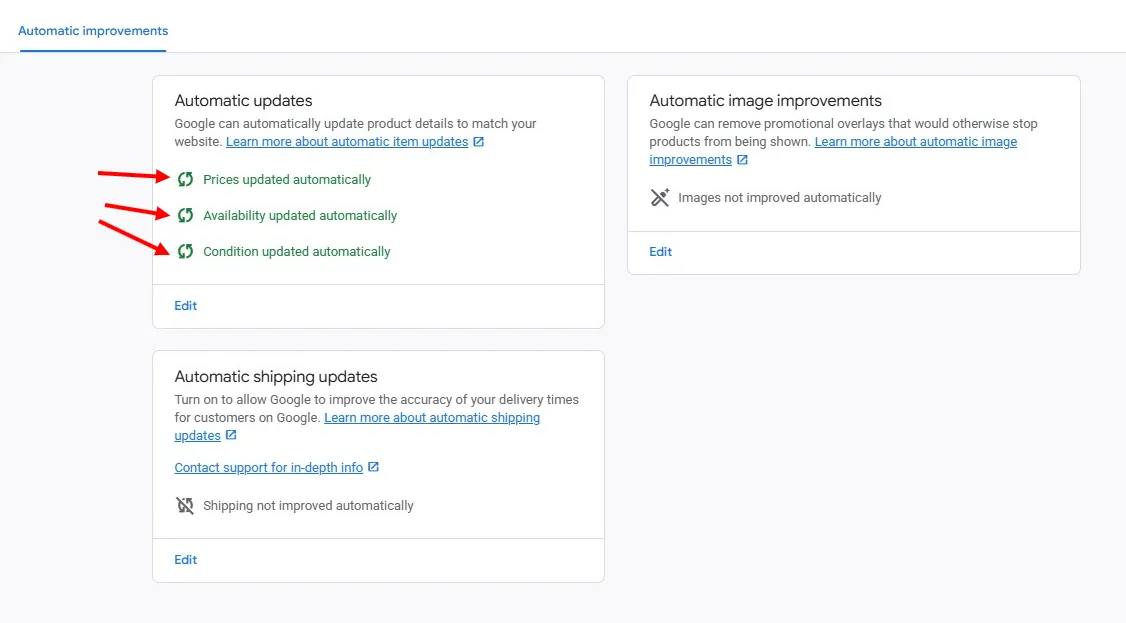
Your products will stay active during price and inventory changes, and shoppers will get a positive experience, even if they don’t buy from you.
Enable automatic improvements. Automatic Improvements is one of those “set it and forget it” features that prevents problems you don’t want to deal with manually.
What else does Google pull automatically?
Beyond the attributes you control through Automatic Improvements, Google also pulls product information directly from your pages, and sometimes from competitors’ pages, to display in the Knowledge Panel.
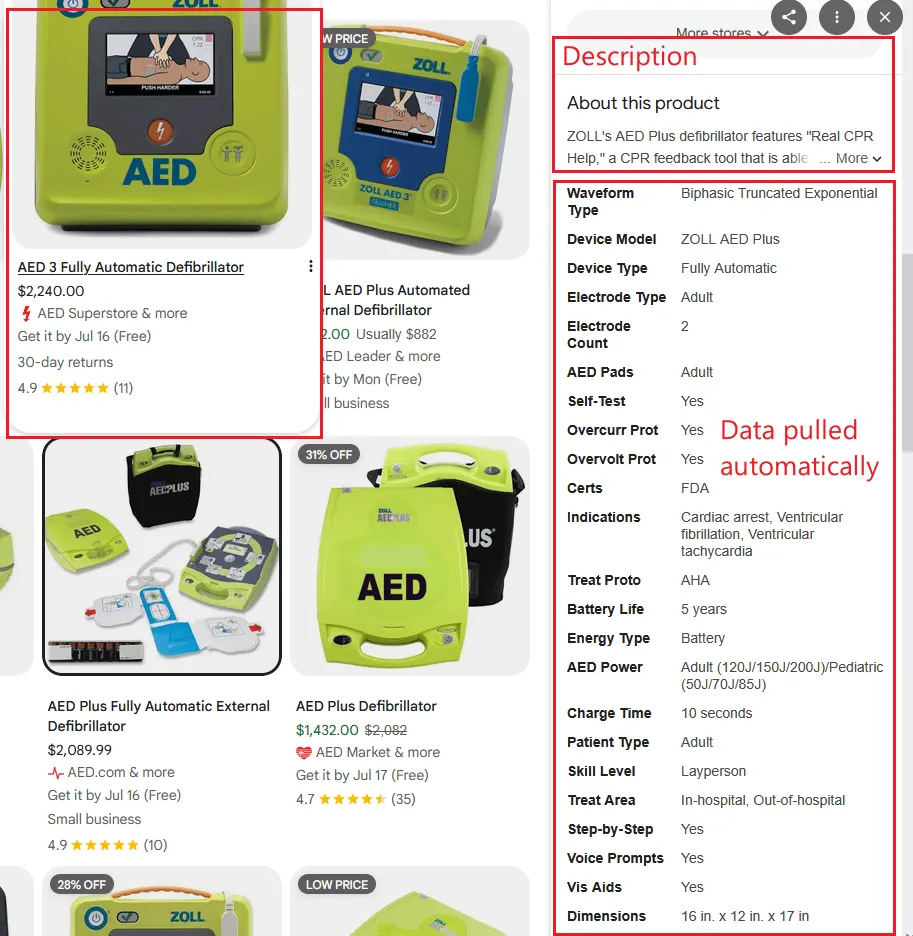
When multiple merchants sell identical products (matched by GTIN), Google creates a hybrid listing that aggregates information from the most trusted sources.
You might see technical specifications in the Knowledge Panel that you never submitted to GMC because Google extracted them from your structured data or pulled them from another merchant’s better-documented listing.
Google’s auto-enhancement algorithms are undocumented and selective. You can optimize your structured data foundation, but you can’t guarantee results. Focus on what you control — your feed data and on-page markup.
How GMC Attributes Feed AI Shopping Recommendations
Google Shopping isn’t just the Shopping tab anymore.
AI Mode, AI Overviews, and Gemini are now active surfaces for product discovery. When someone asks “what’s the best organic cotton duvet under $200?” they’re not clicking through to ten product pages — they’re getting a curated shortlist from Google’s AI.
Your products are either in that shortlist or they’re not.
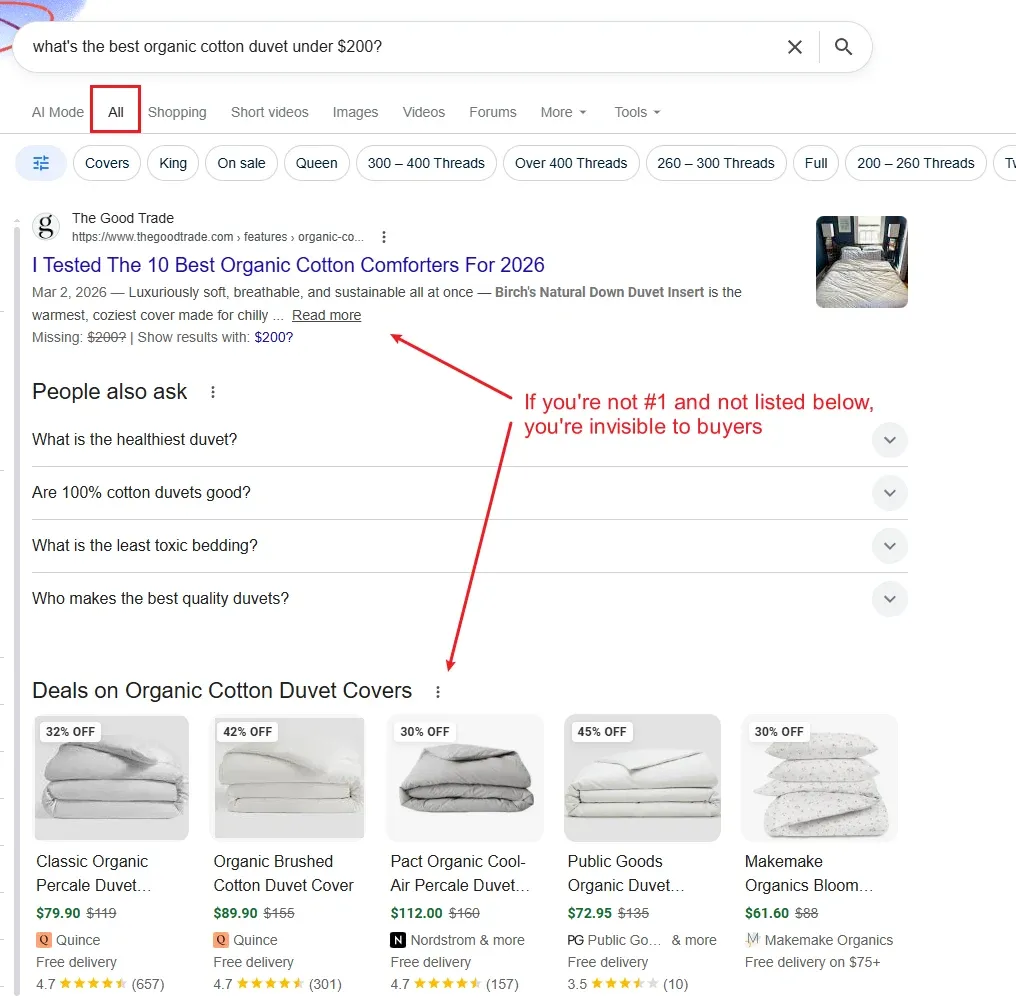
The attributes you submit to GMC directly influence that shortlist.
And it’s not just Google…
AI tools like ChatGPT, Claude, and Perplexity can derive the majority of data through crawling your website and scraping the structured data on your product pages.
If your store is on Shopify or Etsy, your product data is shared directly with ChatGPT as part of a data deal between these platforms and OpenAI — no action needed.
You can even submit a product feed directly to OpenAI to make your products discoverable inside ChatGPT, with purchases completing on your own storefront.
Structured Data Completeness Is the Entry Ticket
AI search tools don’t browse the web the way humans do. They draw from knowledge graphs — structured repositories of entities, attributes, and relationships that Google has built from crawling billions of pages.
A product with a valid GTIN gets matched to Google’s product knowledge graph, which connects it to brand reputation, category context, and competitive pricing signals across merchants.
Brand, Google Product Category, and Product Type work together to position your product correctly in the search categories your customers browse.
Product Highlights Give AI Something to Work With
AI systems need extractable feature data to make useful recommendations.
A shopper asking Gemini for “a lightweight men’s running jacket under $150 that packs down small” will get results where the AI could find specific attributes — weight, packability, gender, price — across product data sources.
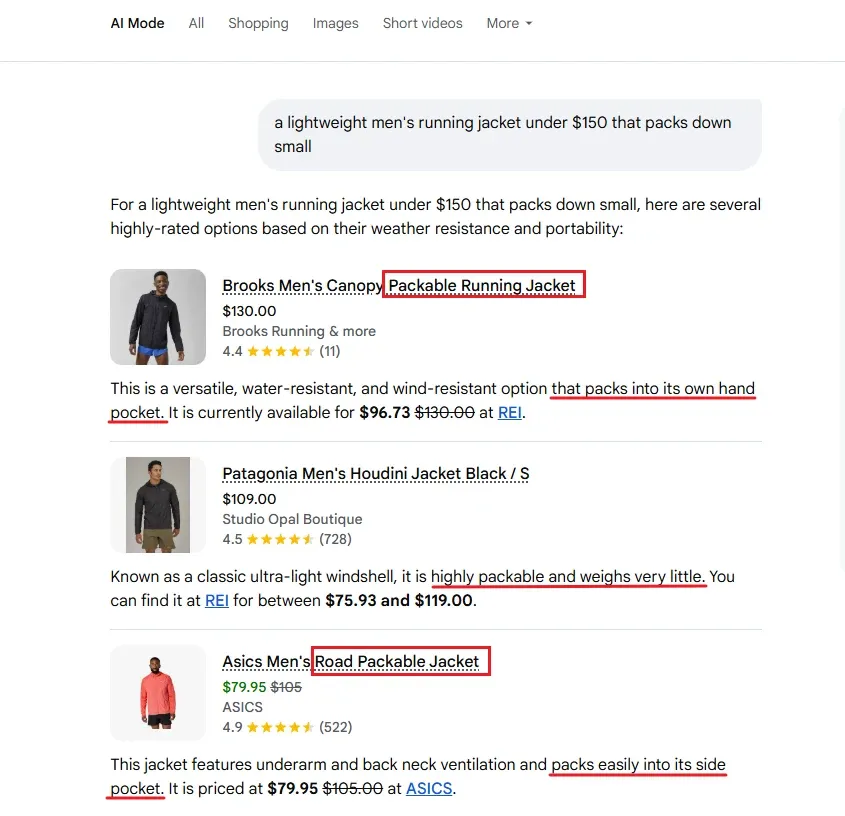
Product highlights help surface that data. A well-written highlight like “Packs into its own pocket” or “Weighs under 200g” gives AI search tools a concrete, extractable specification to match against conversational queries.
Ghost Rankings and Cross-Surface Visibility
Ghost Rankings — a term coined at Digital Commerce Partners — describes products that appear in AI-generated results without generating attributable clicks in your analytics. The products get mentioned, or parts of their content are pulled into the answer, but the user never sees or navigates to your product page.
Ghost Rankings are increasingly common as AI search features condense the buying journey.
Your GMC attributes determine whether you’re in that recommendation pool at all. Completeness of structured data — GTIN, brand, category, detailed descriptions — is how you get in the pool. The relevance of those attributes to the query is how you stay there.
AI search surfaces reward data richness. Every attribute you skip is a signal you’re not sending.
Your Attributes Are Your Visibility
Not all of the product attributes you optimize will ever surface on Merchant listings.
It can be frustrating to learn that your carefully crafted titles are actively rewritten in Shopping. Or to find out that the product highlights you spend so much time on no longer show in the Knowledge Panel.
Regardless, they shape the underlying connections that match your products to the searches and conversations your customers are having online.
Just like search, Shopping algorithms continuously change the rules of the game. Merchants have to play catch-up and adapt.
One thing is guaranteed: a clean feed and well-optimized attributes get your products in front of buyers.
Part 4: Build Store Quality by Building a Quality Store covers the third pillar — how Google scores your store experience and performance, and how to configure the metrics that actually move your ranking.