
Table of Contents
Perfect feed architecture, immaculate rows and columns of product attributes. It’s easy to get lost in optimizing for what you think the algorithm wants to see.
But the algorithm serves humans. It’s humans browsing the Shopping panel. It’s humans that will ultimately buy…or not buy…your products.
Shoppers want a great deal on price, but they also want an easy checkout, the ability to pay with their preferred method, a timely and reliable shipping process, and the security of a smooth return process, should they regret their purchase.
That’s where Store Quality comes in. It’s a cumulative score in Google Merchant Center based on user experience and site performance that shows Google whether your store is a good place to shop.
In this article, I’ll cover what Store Quality is, what earning the badge actually gets you, how to optimize each domain to hit Exceptional, and what to focus on beyond what Google measures.
Store Quality: What Google Is Looking For
Four domains determine your Store Quality score: shipping speed, return policies, payment options, and site performance.
Google rates each on a scale of “Low,” “Fair,” “Good,” “Great,” or “Exceptional,” then calculates your overall score. The final score is an impression-weighted average compared to other merchants in your category.
Hit “Exceptional” overall, and you earn the Top Quality Store badge.
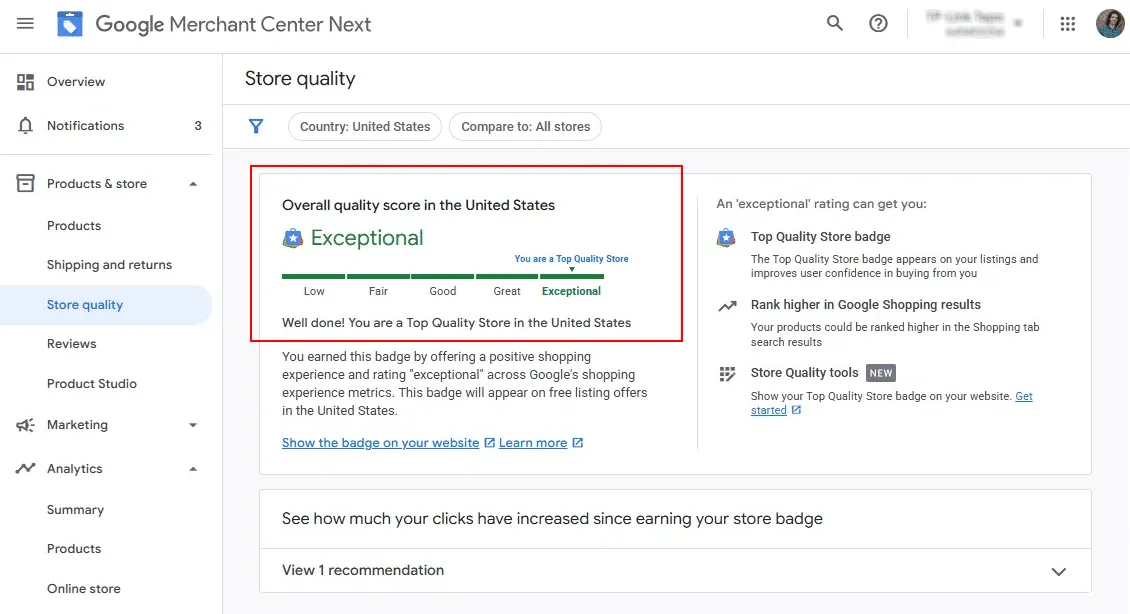
It says it right there on the screen: An “Exceptional” rating gets you:
- Top Quality Store badge: appears on your listings and improves user confidence in buying from you
- Higher rankings in Google Shopping results
- Marketing tools: show your Top Quality Store badge on your website to reinforce trust
Store Quality scores are easily achievable for most stores. Configure your GMC settings correctly and maintain basic ecommerce standards, and you’ll score competitively against other merchants in your category.
Shipping Experience: Speed, Cost, and Reliability
What Google measures
The number of days you promise in your GMC shipping settings for customers to receive orders.
The shipping cost you charge, as set in your GMC settings.
Google compares what you promise against what your competitors promise. They’re not tracking whether packages arrive on time, just what you advertise.
What you should optimize
Google’s Store Quality algorithm only sees your promised delivery times and costs. But your actual performance determines everything else that matters for your business.
Promise two-day shipping but deliver in four days? Google won’t penalize your Store Quality score, but those late deliveries destroy customer trust, generate negative reviews, and kill repeat purchases.
Don’t undersell yourself with seven-day promises when you reliably ship in 3-4 days. Competitors who promise faster delivery will outrank you. But don’t overpromise two-day delivery if you only hit that timeline 60% of the time.
Promise what you can deliver consistently. Reliability trumps speed for long-term success.
How to configure this in GMC
Set up your shipping services in Merchant Center with both delivery time and cost specified. If you offer multiple shipping speeds (standard, expedited, overnight), configure each as a separate policy and tag your products accordingly.
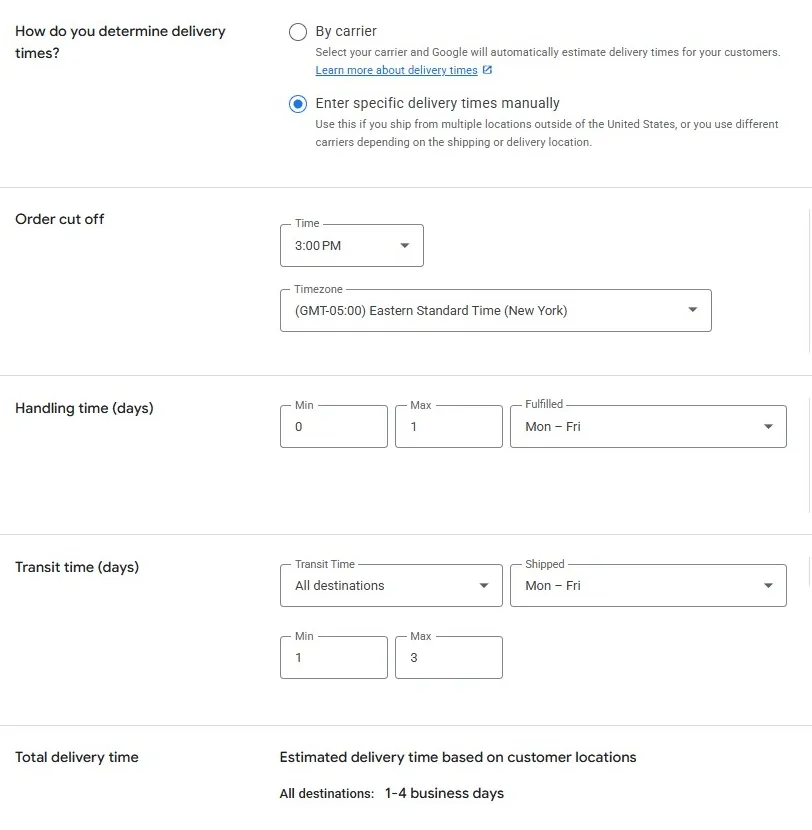
For digital products, set delivery times to zero — the closest approximation to instant delivery GMC supports. The platform is built for physical products; digital is allowed, but some features may be limited.
Return Experience: Policies and Reality
What Google measures
The number of days customers can return items, as defined in your GMC return policy settings.
What you charge customers for returns — free, fixed, or customer responsibility.
Google only looks at what you promise, not how smoothly your actual return process runs.
What you should optimize
Your return policy needs to be competitive within your category and easy to execute without creating friction.
Longer return windows signal confidence in your products: 30 days is the baseline. 60-90 days stands out and costs you almost nothing. Most returns happen in the first two weeks anyway. This helps your Store Quality score if your category norm is shorter windows.
Free return shipping is ideal but not mandatory. If you can’t offer it profitably, be upfront about the cost. “Customer pays return shipping” won’t kill your score if that’s standard in your category.
Transparency beats generosity. Google measures what you promise. Customers care about clarity. A simple, scannable return policy that’s easy to understand beats a technically generous policy buried in legal language.
How to configure this in GMC
Set up your return policy in GMC’s return policy editor. Link to your actual website return policy, and Google will verify your GMC settings match your site.
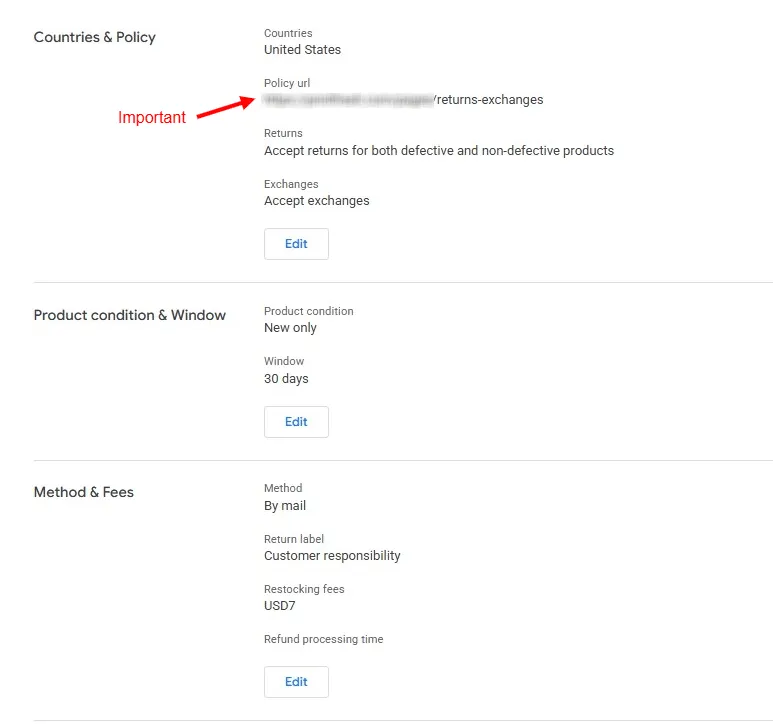
If your catalog has mixed return policies — custom items, perishables, health products — create separate policies in GMC and assign them to the relevant product groups.
“No returns” is a valid policy for certain products. Google doesn’t penalize appropriate no-return policies for custom goods, perishables, or health/safety items.
What can negatively affect your Store Quality score is unclear, inconsistent, or misleading return information. If your GMC says “30-day returns” but your website says “15 days for sale items,” that’s a problem.
Make your return process easy. Respond to return requests quickly and process refunds promptly. Customers who have smooth return experiences leave better reviews, buy again, and create fewer customer service headaches.
Purchase Experience: What Is Tracked and What Matters
What Google measures
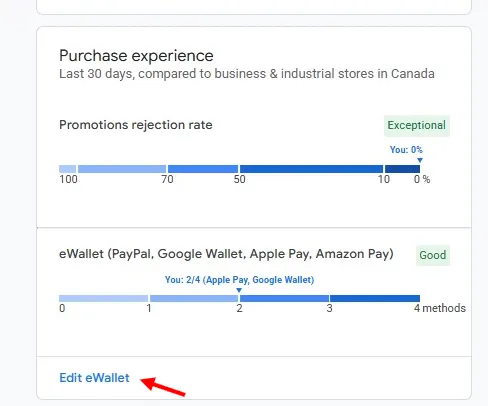
If you run promotions in GMC, this is the percentage that gets disapproved. It only applies if you submit promotions.
How many of these four payment methods do you accept: PayPal, Google Wallet, Apple Pay, Amazon Pay. Detected automatically from your checkout.
That’s it. Google doesn’t measure checkout friction, cart abandonment, payment failures, or most other purchase experience factors.
What you should optimize
Just because Google can’t measure checkout quality doesn’t mean you should neglect problems. A broken or frustrating checkout loses sales, creates negative experiences, and costs you money.
Multiple payment options capture more customers. Credit cards are baseline. Add the e-wallets Google tracks: PayPal, Apple Pay, Google Pay, and Amazon Pay. Each additional option improves your score and captures shoppers with strong payment preferences.
Someone who exclusively uses Apple Pay will abandon your cart if you don’t offer it, even if they have a credit card available. You lose the sale, and they have a negative experience.
Fast, simple checkout reduces abandonment. Guest checkout should be available. Requiring account creation before purchase kills conversions. Let people buy first, then create accounts.
Pricing clarity builds trust. Show total amounts, including shipping, as early as possible in the checkout flow. Surprise costs at the final step create the negative experiences that show up in reviews.
If you run sales through GMC — and you should for Shopping visibility — make sure promotional prices match your live site exactly. Mismatches trigger disapproval.
Coordinate feed updates with actual promotions. Sudden price changes without quality control create discrepancies that damage both your score and customer trust.
How to configure this in GMC
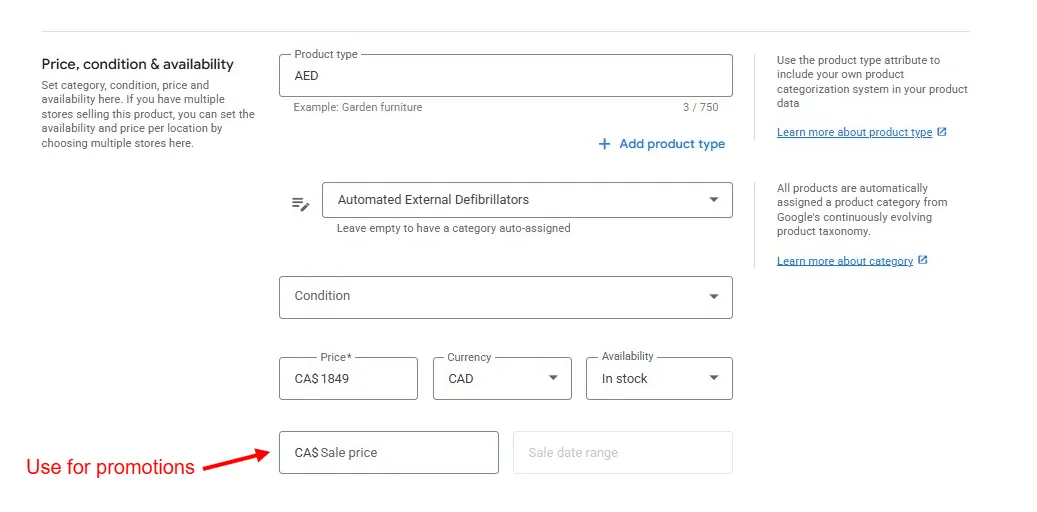
Add as many of the four tracked e-wallets as your platform supports. Most modern checkout solutions (Shopify, WooCommerce, BigCommerce) integrate these easily. Make sure payment methods are visible in your checkout so Google’s crawler can detect them. For promotions, use the dedicated sale price field in your feed. Don’t simply change the price attribute.
Beyond the metrics:
Even though Google doesn’t measure most checkout elements, it’s not a good idea to ignore them.
- Reduce form fields
- Enable address autocomplete
- Provide clear error messages
- Show order summaries
- Send immediate confirmation emails
These elements will improve actual conversion rates and create positive experiences that lead to better reviews.
Browsing Experience (Beta): Technical Performance Matters
What Google measures
Percentage of product images on your site over 1048 pixels (width or height).
Average number of images per product.
Load time on desktop, measured with Core Web Vitals.
Load time on mobile.
Google crawls your product pages and measures this directly.
What you should optimize
As a technical SEO specialist, this is my territory. The factors that matter for Store Quality also matter for organic rankings, conversion rates, and user experience.
Site speed is non-negotiable. Shoppers won’t wait for slow pages. With dozens of vendors selling similar products, a three-second load time will lose to a one-second load time, in both Store Quality scores and actual sales.
If you’re on Shopify or another hosted platform, you’re probably fine by default. Although you should verify your actual performance in Google Search Console. If you’re on WordPress or a custom-built site, audit and optimize regularly.
Image quality matters for conversion. High-resolution product photos that showcase details help shoppers make purchase decisions. Google specifically measures images at 1048 pixels or more, which is relatively small by today’s standards. A 1200x800 image qualifies, but use full HD where possible.
Multiple images per product also help. Show different angles, lifestyle shots, and detail views. More images generally improve both your score and conversion rates.
But image performance matters equally. A 5MB uncompressed image that takes forever to load ruins the experience, even if it’s high-resolution.
Use proper image optimization: WebP format, lazy loading, and responsive images that serve appropriate sizes for each viewport. Most modern platforms handle this automatically, but verify that it’s working.
Mobile performance is critical. More Shopping searches are done on mobile than on desktop. If your product pages aren’t mobile-optimized - readable text, tappable buttons, easy navigation - you’re losing both Store Quality points and actual sales.
How to optimize
Check Google Search Console for your Core Web Vitals performance. If you’re failing those metrics, fix them before worrying about advanced optimizations.
Review several product pages to verify image quality and quantity. Make sure you’re showing multiple high-resolution images consistently across your catalog.
If you’re short on product photography, use Google’s Product Studio (available in Merchant Center Next and Shopify’s Google & YouTube app) to generate additional images with AI.
Beyond the metrics:
Page speed and image quality affect more than Store Quality scores; they directly impact conversion rates, bounce rates, and organic search rankings. A slow, poorly-presented product page loses sales regardless of your Shopping visibility.
Store Rating
What Google measures
A free program where Google sends an opt-in survey to customers after purchase and aggregates the results. You don’t control the collection process, but you also don’t have to manage it. Reviews are tied to your Merchant Center account and feed directly into your Store Rating score.
Third-party platforms like Trustpilot, Sitejabber, Reviews.io, and Bazaarvoice that collect verified purchase reviews on your site and sync them to Google. You manage the review program, but Google pulls the aggregate score into your Store Rating.
Data Google collects through its own shopping research — delivery speed, return processing, and purchase experience signals gathered from shoppers who bought from your store. This runs in the background and doesn’t require any action on your part.
What you should optimize
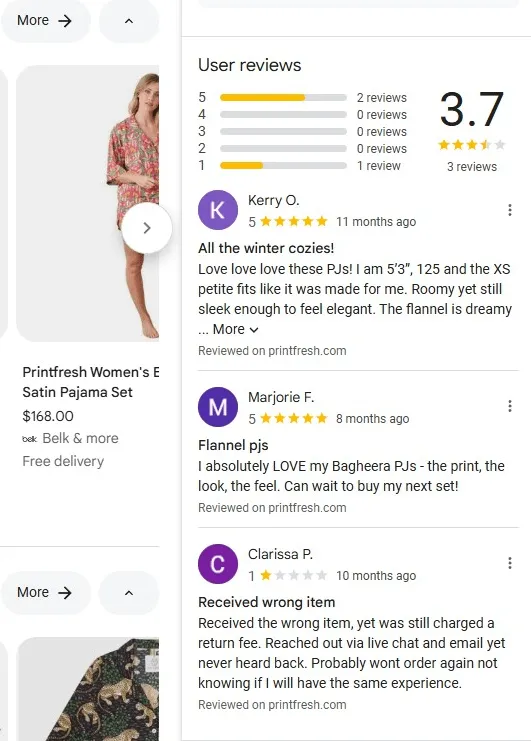
Reviews are the direct reflection of customer experience. Everything else in this article — shipping reliability, easy returns, smooth checkout, fast sites — shows up here in customer feedback, alongside actual opinions about your product quality and fit.
Volume beats perfection
A product with 4.3 stars from 50 reviews outperforms a product with 5.0 stars from three reviews. Consistent purchase history builds trust.
Recency matters
Google weighs newer reviews more heavily. Products with consistent 4+ star reviews over the past six months signal reliable quality.
Review velocity influences visibility
Products actively collecting reviews get more prominent placement than products with stale two-year-old reviews.
Negative reviews aren’t fatal
A few 3-star reviews mixed with mostly 4- to 5-star reviews increase trust; perfect ratings look suspicious. What matters is your response to negative feedback and your overall trend.
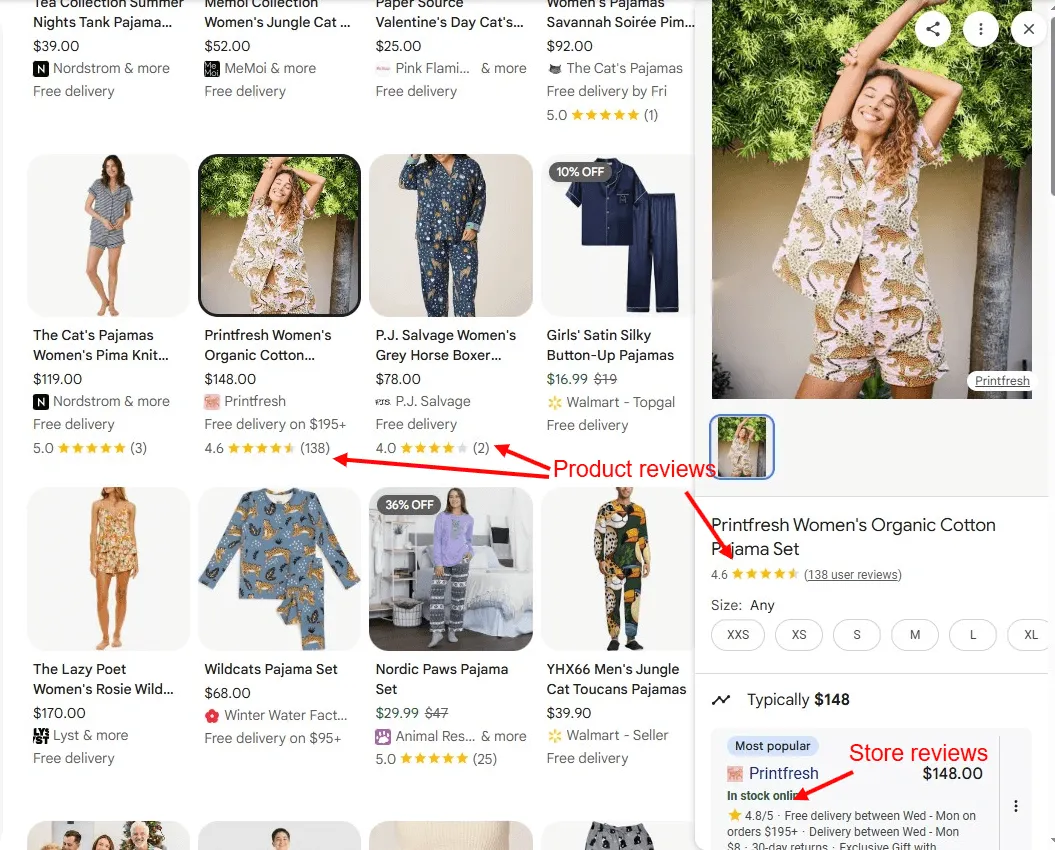
Product reviews are different from Google Business Profile reviews.
GBP reviews rate your business overall. They are great to use on your website, but they don’t help your Store Quality metrics. Store Rating focuses on your product performance and verified reviews after purchase.
How to get reviews in GMC
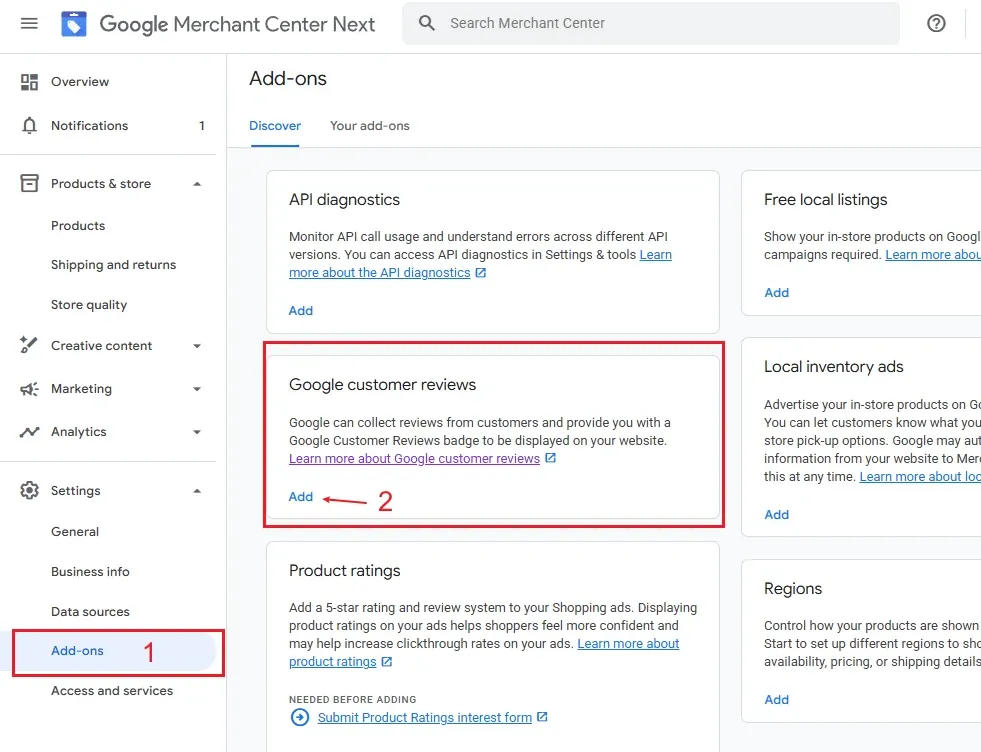
To enable Google Customer Reviews, go to Settings → Add-ons in Merchant Center. Under the Discover tab, find the Google Customer Reviews card and click Activate. Your account needs to be verified and claimed before this option is available.
If you work with an approved third-party review platform, like Yotpo or Reviews.io, they feed review data to Google automatically. Consult your provider if reviews aren’t showing up for your products.
You can learn more about setting up reviews in Google’s official documentation.
How Store Quality Scores Work
Understanding the mechanics helps you prioritize improvements:
Scores update daily based on a rolling lookback period. If you’ve been scoring “Fair” for months, improvements may take a few weeks to be reflected.
All metrics are impression-weighted. Products with more Shopping impressions have a bigger impact on your score. Your best-selling, most-visible products matter most.
You’re compared to your category, not all merchants. Performance expectations differ between product types.
You don’t need “Exceptional” everywhere to get an “Exceptional” overall score and earn the badge. You can be “Good” in some areas and “Exceptional” in others.
Missing data hurts you. If you don’t provide shipping speed or return window information, you don’t get scored, and blanks count against you.
There’s no penalty for low scores. Store Quality is a rewards program. You don’t lose visibility for “Fair” scores; you just don’t get the bonus visibility that “Exceptional” stores receive.
To check your store rating in Google, visit this URL: https://www.google.com/storepages?q={your website}
Replace {your website} with your homepage URL and append a country code — &c=US, &c=AU, etc. — if your store operates across multiple markets.
Start with What Google Can See
Store Quality is fundamentally a configuration exercise. Google measures what you tell it:
- Delivery times in your shipping settings
- Return window in your return policy editor
- E-wallets your checkout supports
- And what it can crawl on your product pages
Configure those settings correctly, and Store Quality takes care of itself. The harder work is ensuring what you promise matches what you actually deliver — the reviews, repeat purchases, and long-term Shopping performance all depend on that.
This is the last piece in the series. If you’ve worked through all four parts, you now have the full picture:
- Build clean feed architecture that gives Google accurate data
- Optimize your attributes to match your products to the right searches
- Configure Store Quality to turn visibility into trust
- The Google Shopping hub has the complete overview and the strategic case for organic Shopping investment
If your GMC setup isn’t generating the Shopping traffic it should, let’s talk.