
Table of Contents
TL;DR About Merchant Center
Bottom Line: Google Shopping captures a third of retail searches and generates 2-3X more revenue per session than organic search. If your products aren’t in Merchant listings, you’re invisible to ready-to-buy shoppers.
Success requires both structured data for discovery and Google Merchant Center for real-time control. Most stores fail by creating chaotic feed systems with multiple data sources that become maintenance nightmares.
Best ROI comes when you build clean data architecture before scaling. Fix product attributes upfront (color, size, material for apparel) or face expensive retrofitting with thousands of SKUs later.
Prioritize Store Quality optimization: shipping speed, return policies, payment options, and site performance. “Exceptional” scores earn the Top Quality Store badge, higher rankings, and the trust that converts browsers into buyers.
It’s 2026, and this is how ecommerce search looks now:

Yup. It takes 2.5 scrolls to reach the #1 organic result on the search engine results page (SERP), on desktop.
And what’s this? A full section of product recommendations directly in the SERP and ahead of all organic results?
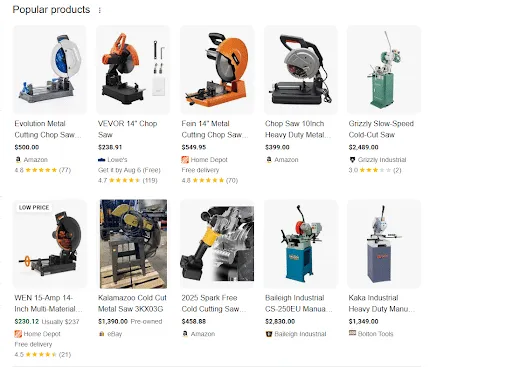
That’s right, these are Merchant listings. Free organic product recommendations powered by Google.
Merchant listing sections can appear in various locations on ecommerce SERPs: between search results, in the right sidebar, in image search, and more. Often, multiple panels appear every 3 to 5 organic listings.
If you want your products to be seen in organic search, set up your Merchant listings ASAP.
In this four-part series, I’ll walk you through everything you need to know when starting with Google Shopping and Google Merchant Center.
Google Shopping in 30 Seconds
“Shopping” is a specialized search section focused solely on product searches. It forgoes the traditional blue link layout and looks much more like a product category page, allowing shoppers to add filters and fine-tune their search.
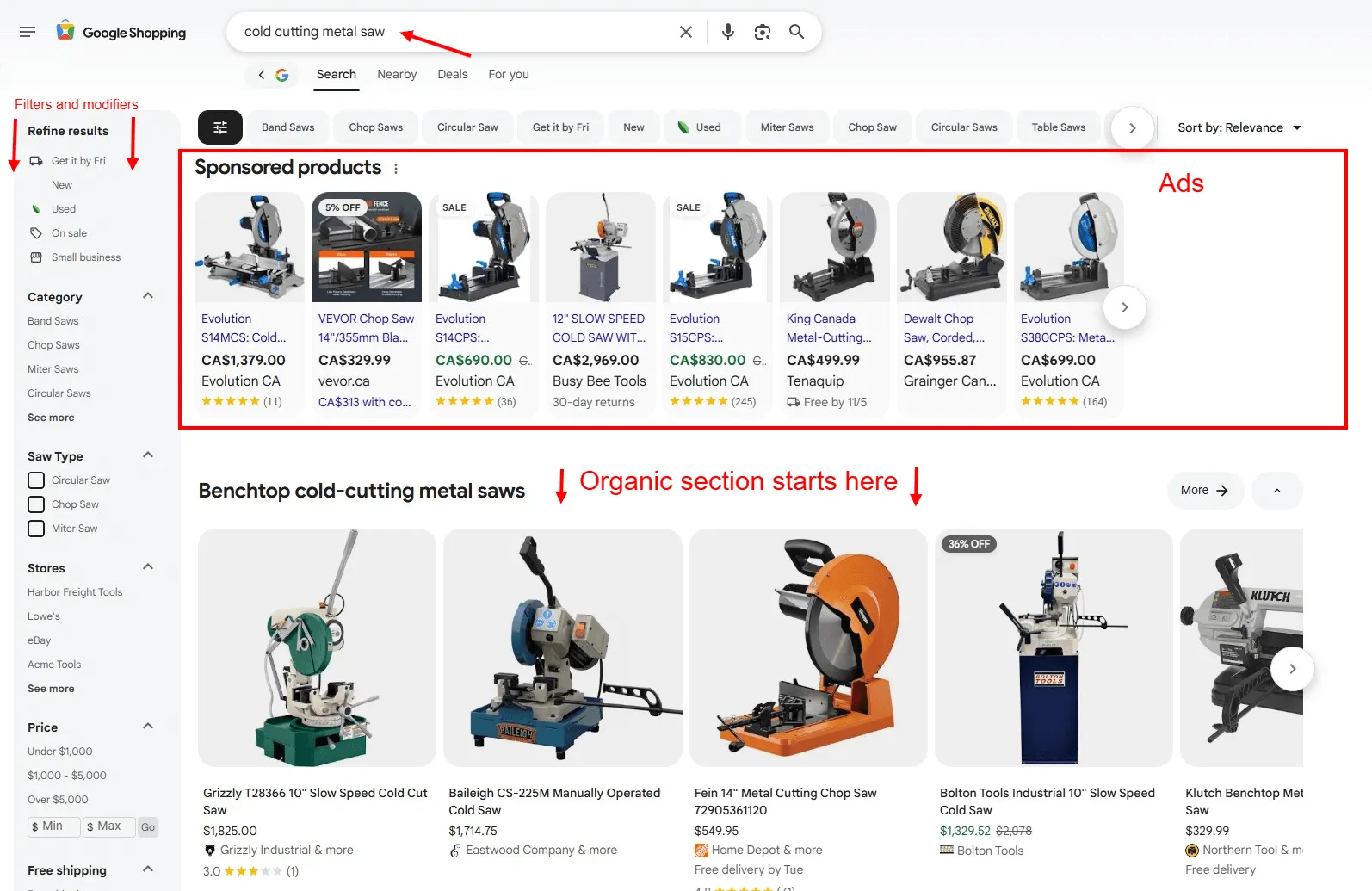
Buyers don’t have to click outside of Google until they’re ready to make a purchase. That’s great for Google, as it secures more real estate for selling ads. But what does it mean for your ecommerce store?
Statistics show that as much as a third of ALL retail searches begin with Google Shopping.
JungleScout research suggests users start more than half of their product searches with Google, which ranks as the second-most-used ecommerce search platform, just a hair behind Amazon.
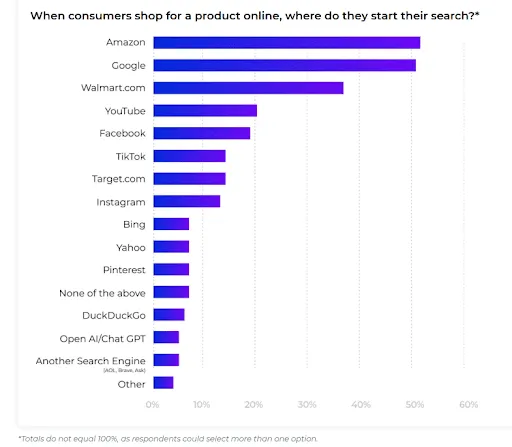
Source: JungleScout Consumer Trends Report 2025
If your store is not on Google Shopping, you’re missing out on visibility and sales.
The Merchant listings shown below are entirely free for the vendors. All they had to do was configure their product feed and/or structured data.
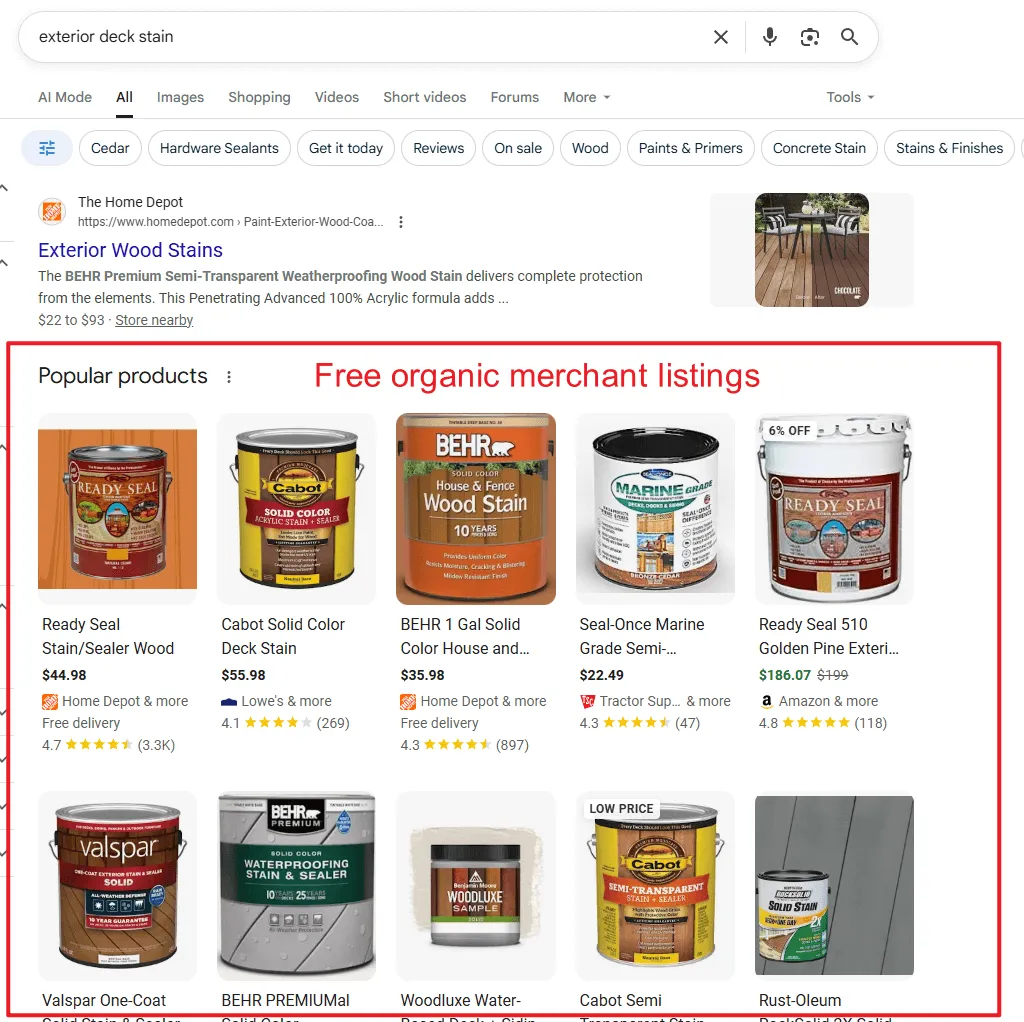
This is free organic traffic with much greater visibility and conversion potential than regular rankings.
And We Have the Data to Prove It
An apparel company we work with:
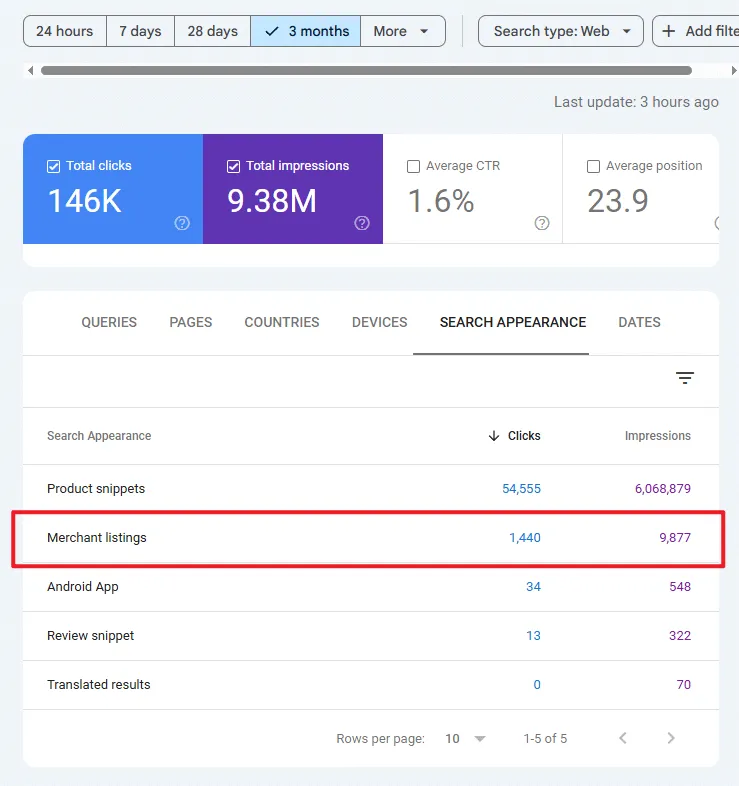
| Clicks | Impressions | |
|---|---|---|
| GSC Total | 146K | 9.38M |
| Merchant listings | 1,440 (0.98%) | 9,877 (0.105%) |
Almost negligible?
Let’s look at Google Analytics:
Organic Shopping brought in 29,809 Sessions (0.54% of total) and $133,287.75 in revenue (1.77%). That’s $4.47 revenue per session.
For comparison, organic search is worth $2.52 in revenue per session.
Organic Shopping sessions are worth 77.38% more than organic search sessions for this client.
Another example - an electronics manufacturer we work with:
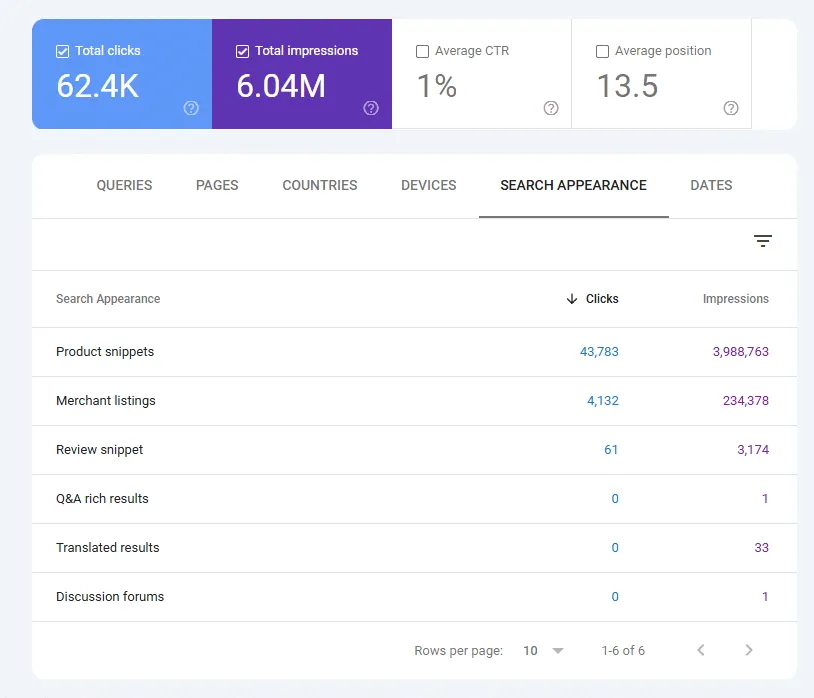
| Clicks | Impressions | |
|---|---|---|
| GSC Total | 62.4K | 6.04M |
| Merchant listings | 4.13K (6.62%) | 234K (3.78%) |
That’s a healthy chunk of traffic coming through Merchant listings.
Even more impressively, if we look at GAv4 for the same client, we see this data:
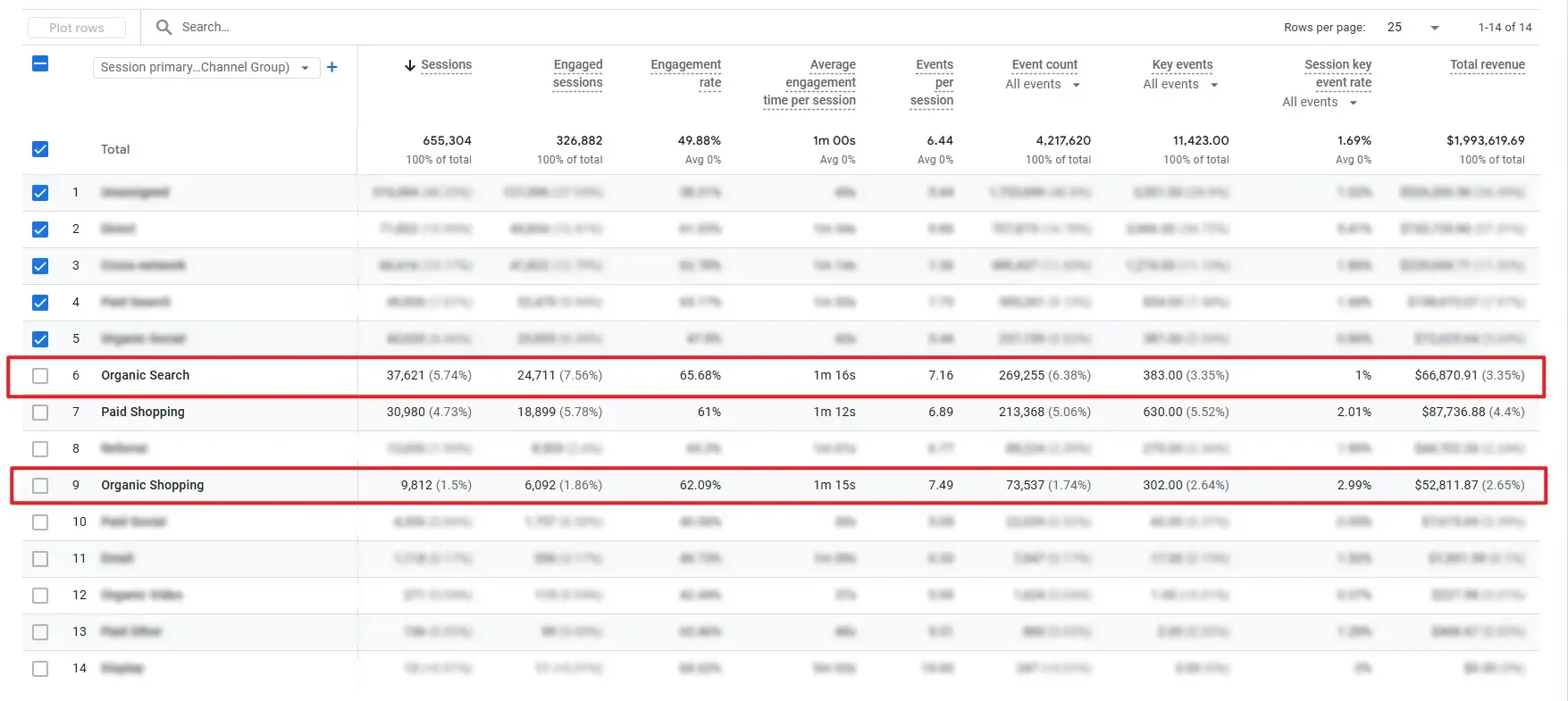
| Sessions | Total Revenue | Revenue per Session | |
|---|---|---|---|
| Organic Search | 37,621 (5.74%) | $66,870.91 (3.35%) | $1.78 per session |
| Organic Shopping | 9,812 (1.5%) | $52,811.87 (2.65%) | $5.38 per session |
Organic Shopping isn’t a significant fraction of total traffic (1.5% of ALL sessions).
However, its value is 3X higher than that of organic search - $5.38 per session vs $1.78 per session.
This balances the scales and makes Organic Shopping nearly equal to organic search in terms of revenue generation for this client.
Shopping clicks come from pre-informed buyers who have already done the research, compared products and prices, and are ready to complete a transaction.
How Do You Get Your Store on Google Shopping?
You have two options, and you need both working together.
Structured data lets Google discover your products organically.
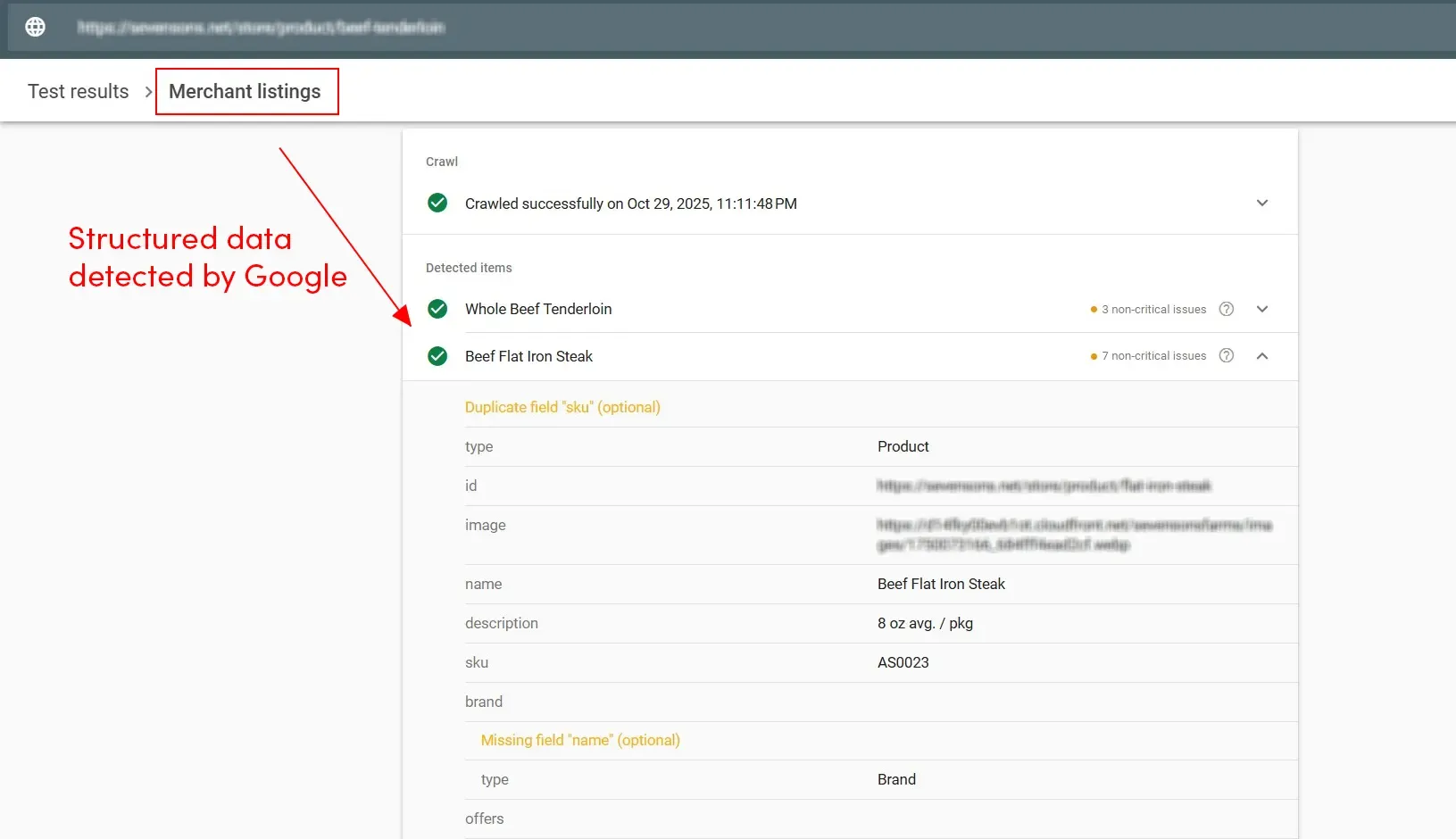
Add the right schema to your product pages, and Google can pull your title, price, reviews, and shipping details directly from your site whenever it crawls.
I’ve written a comprehensive guide to ecommerce schema and merchant listings that walks through the technical implementation.
But structured data alone isn’t enough for competitive markets.
Structured data is passive. It only updates when Google crawls your page. For price changes, inventory updates, or limited-time promotions, that lag will impact your conversion rates. Worse, if your Google prices don’t match your live site, your products will get disapproved when it crawls.
Then there’s the technical reality. General-purpose SEO plugins for WordPress and Shopify work for simple products, but rarely handle all nuances of different product variants, shipping, and return policies.
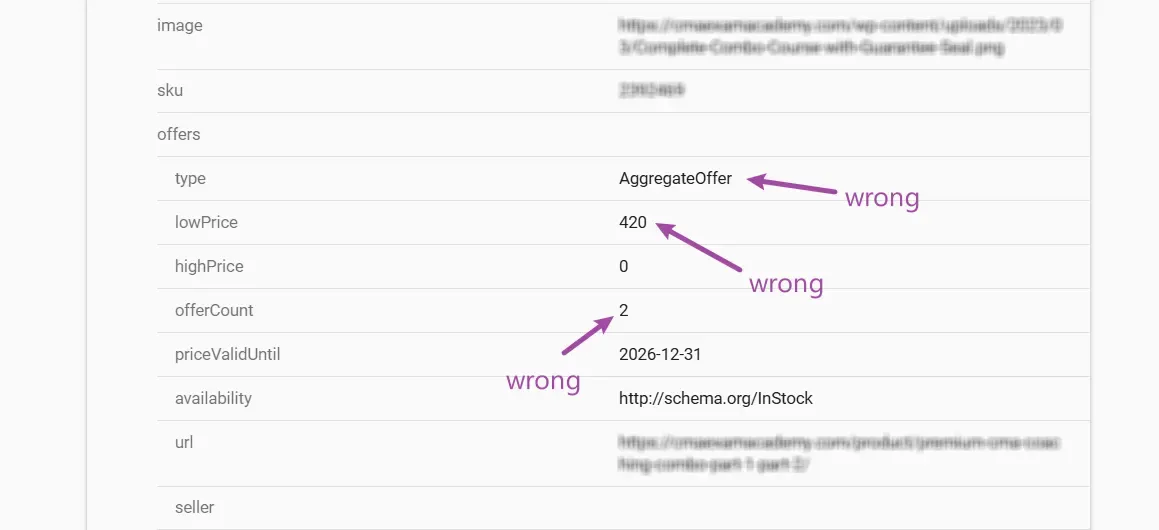
I’ve spent too much time writing custom schema from scratch for clients because their plugins couldn’t properly mark up their products. And even then, that schema was not always automatically tied to their products, so it would go out of date next time they updated key details.
Google Merchant Center solves both problems.
You feed Google your product data directly, and changes are reflected almost instantly. Price drops at 9 am? Your Shopping listings update immediately.
More importantly, GMC gives you control. You can optimize product titles specifically for Shopping, add highlights that don’t appear on your product pages, and organize data exactly how Google wants to see it.
The stores winning in Google Shopping aren’t choosing between structured data and GMC. They’re using structured data as the foundation and GMC as the optimization layer.
Google Merchant Center in 30 Seconds
Google Merchant Center is your direct line to Google’s Shopping ecosystem, and the control center for all your product listings and Shopping ads.
GMC lets you explicitly tell Google everything about your products:
- Titles
- Prices
- Inventory status
- Shipping policies
- Product highlights
Update your feed, and those changes appear across Search, Images, Shopping, and even Gemini within minutes.
The interface is surprisingly straightforward.
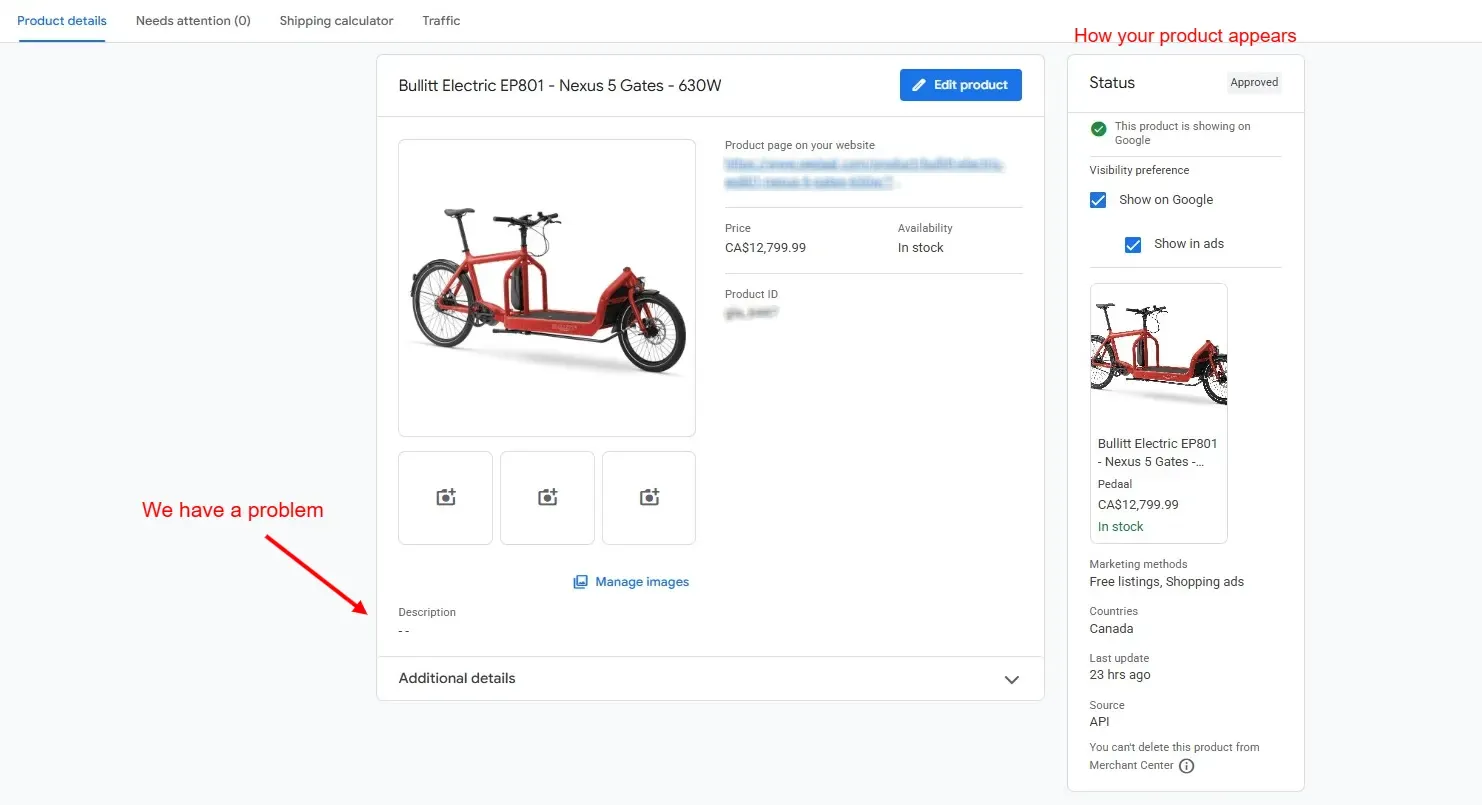
You get a visual editor where you can fine-tune every product detail without touching code, though complicated feed files can feel just as overwhelming.
But GMC does a lot more than just managing your feed. It’s a complete optimization platform that allows you to:
- Set up store-wide shipping and return policies that build buyer confidence
- Configure geographic targeting for local inventory
- Connect to Google Analytics 4 and Search Console to track exactly which products drive revenue
- Collect and display product reviews that influence purchase decisions
The analytics alone are worth the setup time. GMC shows you which products get impressions but don’t convert, where you’re losing clicks to competitors, and which categories underperform. That data feeds directly into your optimization strategy.
And yes, your Shopping ads.
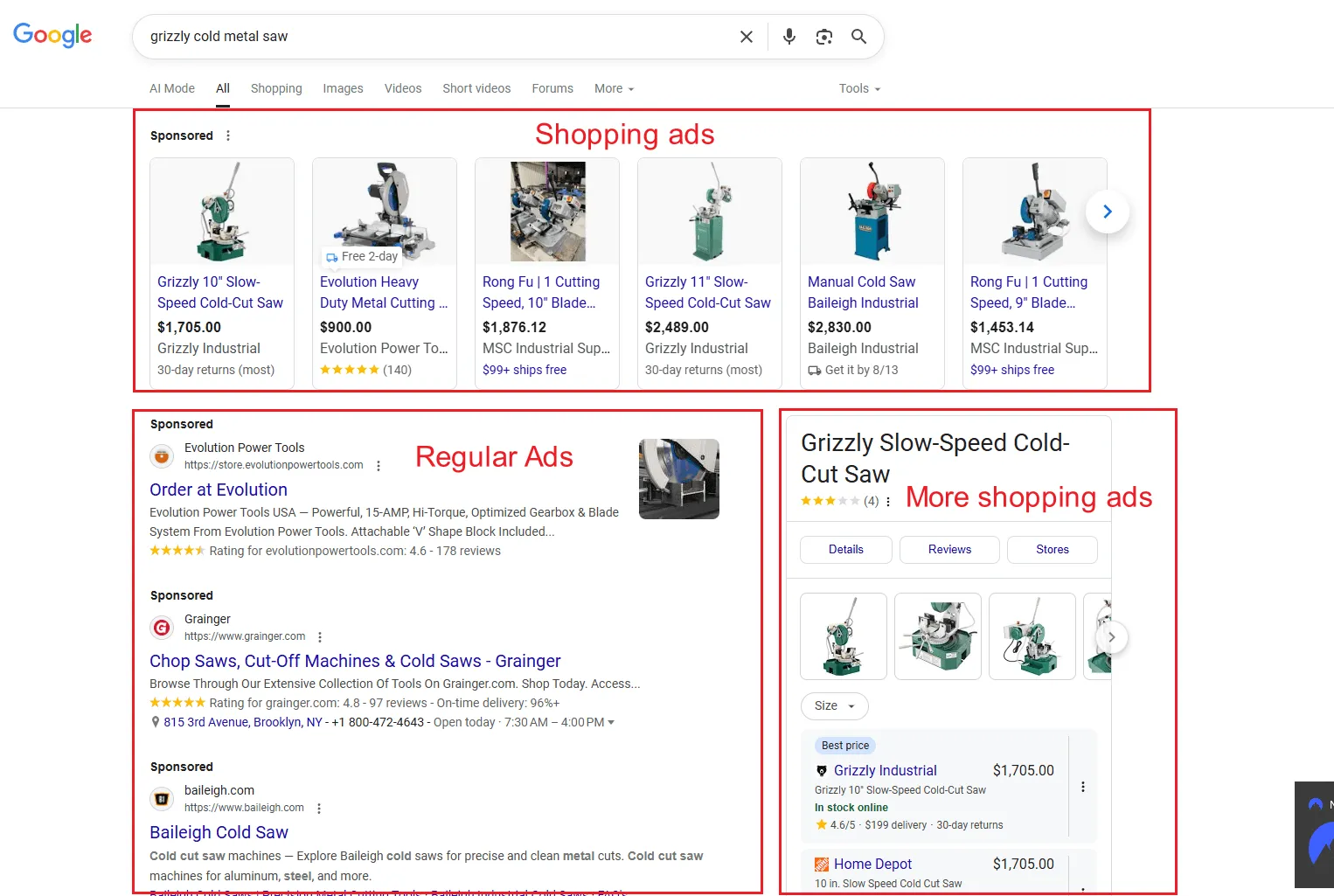
If you’re running Shopping Ads (which you should be), GMC is non-negotiable. Shopping ads capture 85% of retail ad clicks because they show product images, prices, and reviews right in the SERP. They convert at rates that make standard text ads look prehistoric.
But even if you’re not ready for paid advertising, GMC delivers high-intent organic traffic through free Merchant listings.
Outside of the Shopping tab, your product feed data is also extensively used by Google’s AI-powered search features, like AI Overviews and AI Mode. AI systems use detailed product data — attributes like size, material, and brand — to recommend products based on longer, more nuanced conversational queries.
How to Create a GMC Product Feed…And How Not To
Once your GMC account is live and you have connected your store, it’s time to get your product data into the system.
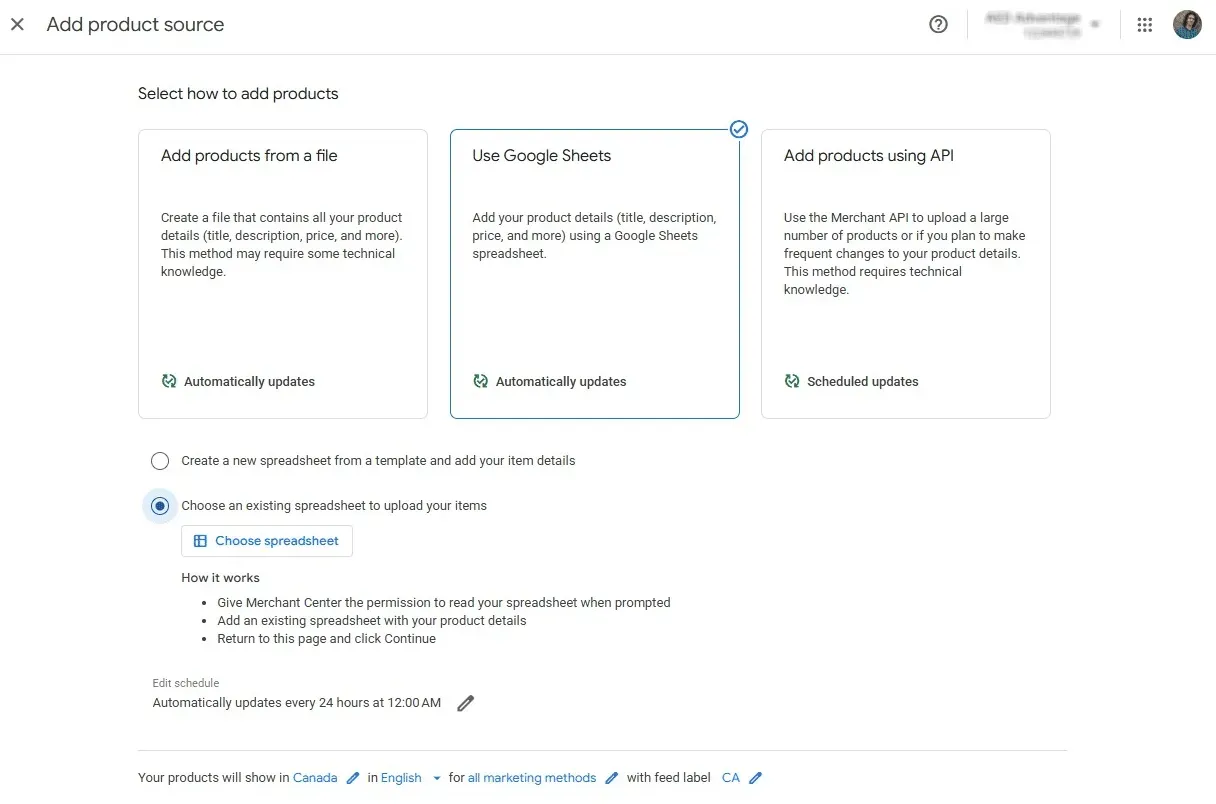
Google Merchant Center gives you multiple options for creating a product feed:
- Spreadsheet uploads
- Third-party feed tools
- API integrations
- Site crawls
- “Found by Google”
- Manual product entry
Each one has its place and use cases.
Manual product entry uses the GMC editor. It’s by far the easiest and most user-friendly, but it only works for a handful of products. Beyond a few dozen products, the maintenance burden becomes too great as there’s no way to bulk-edit these products.
The spreadsheet option is likely to be your favorite. It allows bulk editing and management and is sufficient for up to a few hundred products. And we all love working with spreadsheets…right?… right?!
If your store is already bigger than that, you need to consider the advanced methods for feed management, like API and third-party software.
What happens when you get it wrong?
One client had product data flowing from four different sources. When it came time to optimize, it took three times longer just to understand where each product was coming from before we could make even the slightest change.
Another client’s incomplete apparel attributes capped their Shopping performance until we overhauled their entire feed system — delivering a 120% year-over-year improvement in Organic Shopping revenue.
Settle on a single data source for your primary feed that matches the scale of your store, then use supplemental feeds to add missing data or make alterations for GMC.
Before setting up your first product feed, dive deep into product feed architecture in Part 2 of this series — How to Create a GMC Product Feed…And How Not To
The GMC Attributes That Actually Drive Shopping Visibility
While creating your first feed, you’ll notice Google Merchant Center is calling for specific product attributes.
Some are non-negotiable for your products to get approved and show up in Shopping:
| Always required | Conditionally required | Required for apparel |
|---|---|---|
| Id | Condition (if used/refurbished) | Color |
| Title | Adult (if adult content) | Size |
| Description | Gender | |
| Link | Material | |
| Image link | Pattern | |
| Price | Age group | |
| Availability | ||
| GTIN |
Just filling in the blanks will get your products online. It’s what you put in the blanks that matters for securing visibility and getting those clicks.
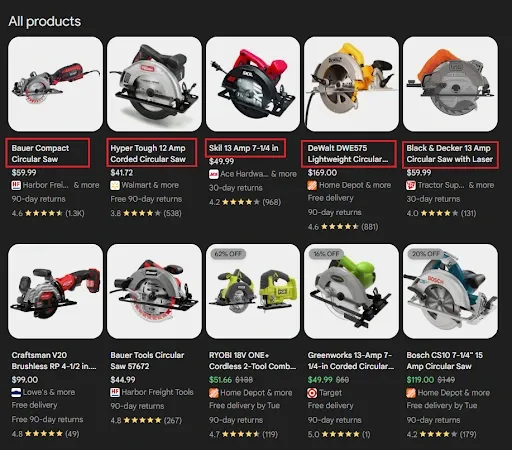
The product title is the main Shopping listing element you control — and it’s where most merchants leave performance on the table. Did you know Google actively rewrites your titles for organic listings without telling you? We discovered this after much frustration and testing across multiple clients.
Knowing where you can push for optimization, where you just need to input the requested data, and which attributes drive clicks from the evermore AI-generated results and recommendations can make the difference between “accepted” and “visible”.
Part 3 of this series goes deep on all of it — The GMC Attributes That Actually Drive Shopping Visibility
Build Store Quality by Building a Quality Store
Customers want the best deals, but they also want to buy from authoritative stores that offer a reliable shopping experience with no unwanted surprises.
That’s where Store Quality comes in. It’s a cumulative score based on user experience and technical performance factors — shipping speed, return policies, payment options, site performance.
Score “Exceptional” on all four metrics and you earn the Top Quality Store badge. It’s a trust signal Google issues automatically and displays alongside your store rating in Shopping.
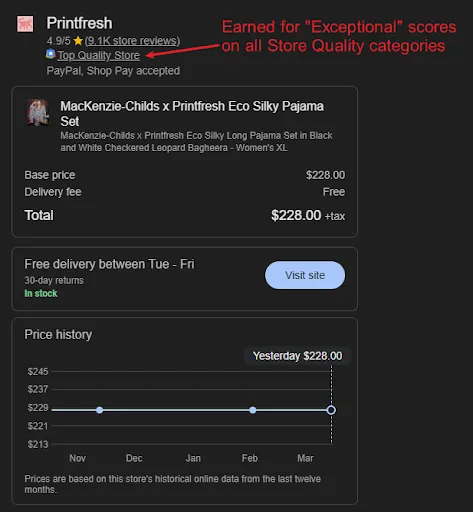
You can also embed a widget on your site that displays the badge and get up to 8% more conversions, says Robbie Wetherell, Support Operations Expert at Google.
Store Quality follows specific rules, and it’s more about what you configure in Google Merchant Center than what you actually deliver as a service.
Site speed is often the hardest metric to hit — but it’s so foundational to every aspect of ecommerce performance. Core Web Vitals are established factors in search rankings, GMC Store Quality, user experience, conversion rates, and AI visibility.
Investing the resources to bring CWV to a comparable level to your main competitors is always worthwhile. Even if that means rebuilding your store.
Consistently shipping slower than the promised time or making returns unnecessarily difficult will result in a poor shopping experience — fewer return customers, worse reviews, and a snowball effect on your business.
Explore the full breakdown in Part 4 of this series — Build Store Quality by Building a Quality Store
Start Winning in Google Shopping
Shopping now controls the majority of ecommerce search visibility on Google. Our clients generate 2-3X more revenue per session from Organic Shopping versus traditional organic search.
The stores winning this traffic haven’t cracked some secret code. Google offers extensive technical documentation on how to work with Merchant Center and optimize your product feeds. The difference is execution:
- Clean product feeds give Google the data it needs to index your products correctly, without the maintenance debt
- Optimized attributes determine which queries you match and whether AI search tools recommend your products or just ghost rank you
- Strong Store Quality turns that visibility into conversions — and signals Google you’re worth ranking higher
If your products don’t get Google Shopping traffic or your current GMC setup has become unmanageable, we can help.
We specialize in ecommerce SEO for profitable D2C brands competing in saturated markets.
Learn more about our ecommerce SEO services.