

Organic traffic is oxygen for ecommerce.
Without it, nothing else matters. Not your optimized checkout flow, not your customer lifetime value calculations, not even your impressive average order value. When traffic tanks, your entire business suffocates. And that’s probably the reason why you’re reading this right now.
Traffic drops in ecommerce hit differently than in other industries. When an online store loses rankings, real money stops flowing. Before enlisting the help of Digital Commerce Partners, I’ve seen seven-figure businesses lose 40-60% of their monthly revenue in a matter of weeks because nobody caught a traffic drop until it was too late.
The problem is, understanding why your traffic is tanking isn’t as simple as reading Google Search Console charts. It takes some detective work, honesty about your site’s weaknesses, and knowing the difference between a temporary blip and an existential threat.
Rank higher, sell smarter.
Shopify’s built-in tools are solid, but in competitive markets—where the stakes are high—basic SEO won’t cut it. Our Shopify SEO services focus on the 20% that drives real results.
Top Causes of Sudden Traffic Drops
Ecommerce traffic drops are rarely mysterious when you know what to look for. The problem is that there are so many potential culprits, and the symptoms often overlap. A 40% drop in organic sessions could be an algorithm update, a tracking failure, a crawl budget issue, or even just seasonal demand shifts that you forgot about. The faster you identify the root cause, the faster you recover.
Traffic drops typically fall into three buckets:
- Marketing issues (algorithm updates, competitor gains, seasonal shifts)
- Technical problems (crawling, indexing, site performance)
- Measurement failures (tracking code breaks, attribution gaps)
Let’s break down the usual suspects so you can diagnose your situation quickly and accurately.
Algorithm Updates Hit Gradually, but Permanently
Google released five core updates between August 2024 and June 2025. Along with that, they announced three Google Spam Updates that also reshuffled the search engine results pages (SERPs). Google’s stated goal was to eliminate 45% of “low-quality, unoriginal content.” They weren’t kidding.
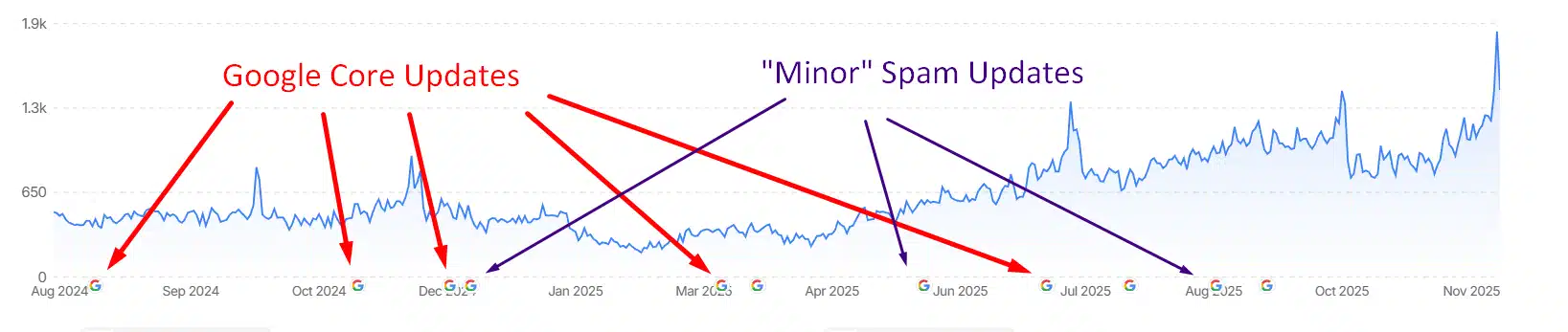
The November and December 2024 updates hit during peak holiday shopping season, a timing that felt almost cruel. Glenn Gabe documented “big drops AND big gains for several ecommerce sites” during these updates, with volatility that whipsawed rankings daily. The March 2025 update specifically targeted small online shops, with some reporting significant profit drops year-over-year.
So, what triggers algorithmic penalties? Think of Google’s algorithm like an extremely judgmental food critic. It’s not just checking if your product pages exist, it’s asking whether they “deserve” to exist.
Common triggers for algorithmic drops:
- Manufacturer descriptions copied across multiple sites
- Product pages with no reviews, Q&A, or usage proof
- Thin editorial content built only to drive affiliate clicks
The recovery pattern I’ve observed across dozens of sites follows a frustrating rule: you typically won’t see full recovery until the next major algorithm update. That can mean waiting 2-4 months in purgatory, hoping your improvements get recognized.
Manual Penalties Obliterate Organic Presence
Google’s manual action system is the SEO equivalent of getting called to the principal’s office. You’ll find these in Search Console under “Security & Manual Actions.” If you see something there, at least you know exactly what’s wrong. Common triggers include unnatural backlink profiles, thin content, or what Google now calls “site reputation abuse” (previously known as parasite SEO).
Algorithmic drops are trickier. There’s no notification, no explanation, just declining numbers. The March 2024 update issued thousands of manual actions for “scaled content abuse” and “expired domain abuse,” but most sites that got hit received no manual action at all, just algorithmic demotion.
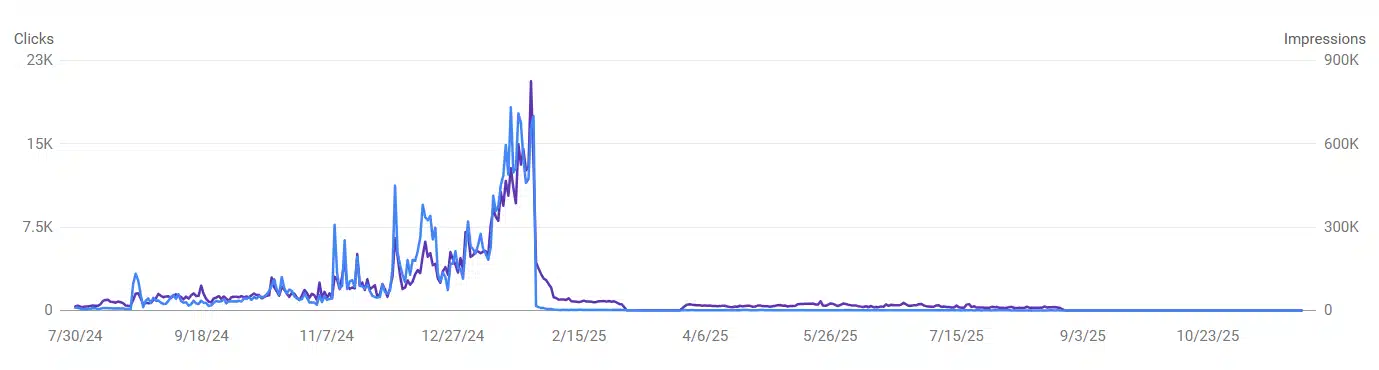
There is nothing gradual about a manual penalty. It’s always the flatline of traffic death.
Here is how to tell the difference:
- Open your Google Search Console property
- Navigate to Security & Manual Actions
- Hold your breath and say a little prayer to a divinity of your choosing
- Click on the Manual actions tab

At best, a manual penalty reduces traffic; at worst, it can eliminate your entire organic presence overnight.
Manual penalties typically stem from aggressive link building schemes, thin or duplicate content, deceptive practices like cloaking, or “site reputation abuse”—letting third parties exploit your domain’s authority with promotional content.
Whatever the cause, though, they hit hard, and they hit long. Often, it is more cost-effective to simply acquire a new domain and start from scratch, because getting a manual penalty removed can be challenging.
Tracking Issues Masquerading as Traffic Drops
Before you spiral into SEO panic, consider this: modern tracking is fundamentally broken in ways that create phantom traffic drops. Between iOS privacy changes, ad blockers, consent requirements, and Google Analytics 4’s event-based quirks, what looks like a devastating SEO disaster might actually be a measurement failure. The same number of people are visiting, and you just can’t see them anymore.
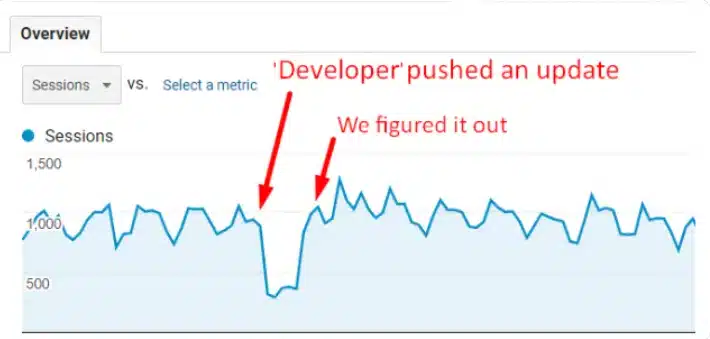
GA4 has introduced new ways for tracking to break. The event-based model handles ecommerce transactions differently than Universal Analytics did, and I’ve seen countless sites where the purchase event fires before the transaction data is fully loaded in the data layer, resulting in “missing” conversions that actually happened.
Current data shows ad blockers now prevent about 45% of mobile client-side tracking pixels from firing, which means a significant share of your visitors simply never show up in your analytics. iOS privacy changes have also cut access to the Identifier for Advertisers (IDFA), Apple’s device-level tracking ID, from about 70% to roughly 10%, making cross-device attribution far less reliable. And with Consent Mode v2 (mandatory since March 2024), 30-40% of users are opting out of cookie tracking altogether.
To diagnose this thorny problem, ask yourself, “Did traffic drop across all channels simultaneously?”
If organic, paid, direct, and referral traffic all dropped at the exact same moment, you’re almost certainly looking at a tracking issue, not a traffic issue. Check your tag implementation, verify the general data protection regulation (GDPR) banner isn’t blocking the Google tag from loading, and compare Search Console click data against GA4 organic sessions.
Crawl and Indexation Problems
For ecommerce sites with tens of thousands of SKUs, crawl budget becomes a genuine constraint. Google won’t crawl infinite pages, and when your faceted navigation generates millions of URL variations, you’re wasting that precious crawl budget on garbage.
Common warning signs:
- Large numbers of pages marked “Discovered – currently not indexed” in Search Console
- New products taking weeks to appear in search results
- Indexed page counts far exceeding actual catalog size
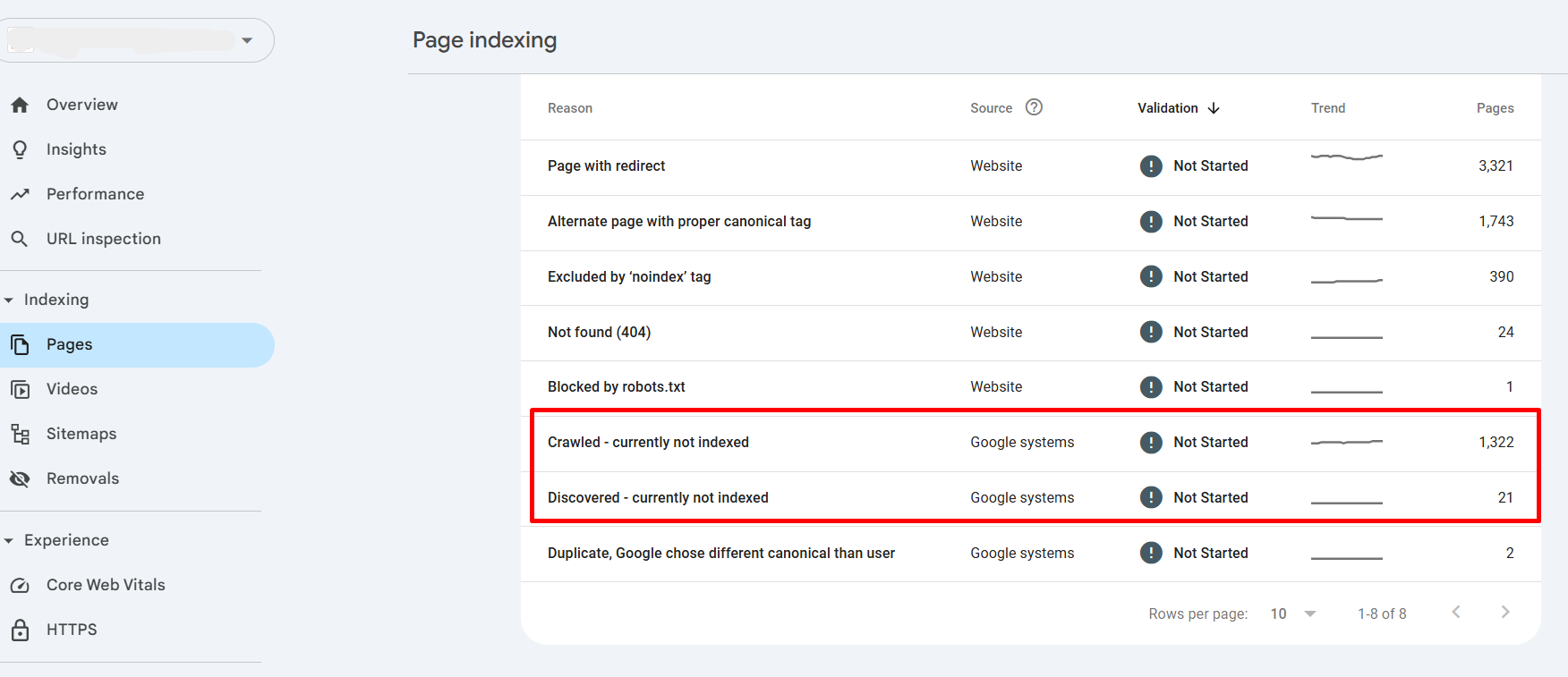
Faceted navigation is often the culprit in lost traffic. A retailer with 1,000 products and five filters with ten options each can theoretically generate millions of URL combinations. Each filter selection creates a new URL, splitting your link equity and confusing Google about which version to rank.
The fix is to block unnecessary filter URLs in robots.txt, use canonical tags to point filtered pages back to their main category pages, and only allow Google to index filter combinations that people actually search for (hint: only high-value combinations with actual search demand, like “leather jacket under $100”).
Merchant Center Feed Issues
Google Merchant Center now powers organic “Merchant Listings” in search results, not just paid Shopping ads. Poor feed quality directly reduces your organic visibility in these increasingly prominent SERP features.
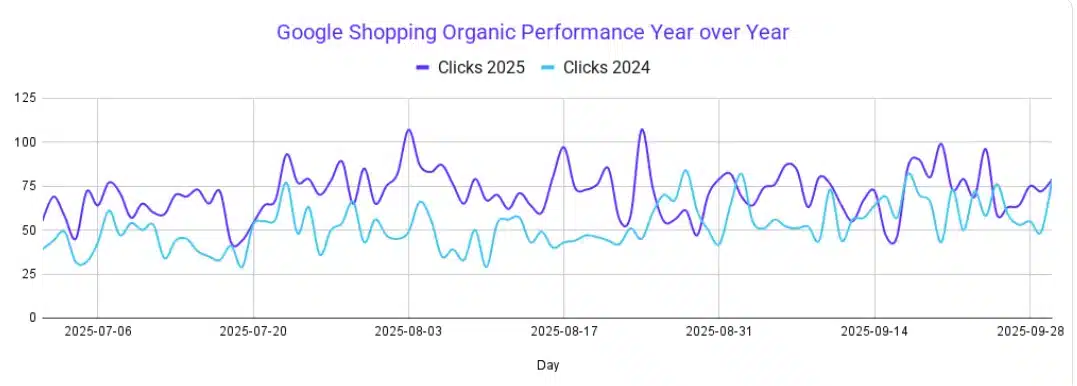
Our feed optimization case study shows what’s possible: we saw an increase of 71.5% in organic revenue and 138% increase in clicks from Google Shopping YoY by simply optimizing the product feed. If your products aren’t appearing in the Shopping tab or product carousels, you’re leaving money on the table.
Common feed issues:
- Missing required attributes (e.g., GTINs, accurate pricing)
- Outdated availability or inventory data
- Mismatches between feed data and on-site content
- Images that fail Google’s quality guidelines
Be sure you understand what is happening with your Google Merchant Center feed and check your Merchant Center Diagnostics regularly — those warnings aren’t suggestions!
AI Is Actively Stealing Your Traffic
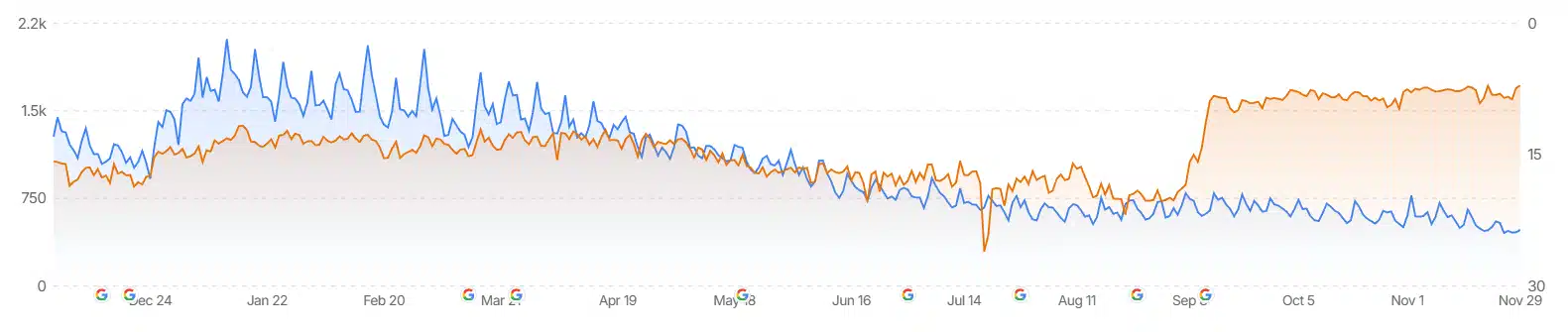
AI platforms are evolving into product discovery tools faster than most people expected, and they’re starting to capture a portion of traditional ecommerce traffic. It’s not time to abandon your SEO strategy, but it is time to start considering how AI fits into the broader picture.
“First, they came for the informational queries
And I did not speak out
Because I was managing an ecommerce site.
…”
In November 2025, OpenAI launched “Shopping Research” for all ChatGPT users. It is a feature powered by GPT-5 mini that asks clarifying questions, pulls from trusted retail sites, and creates personalized buyer’s guides. Shopify CEO Tobi Lütke announced an official partnership with OpenAI in late September 2025, making hundreds of millions of products instantly discoverable within ChatGPT.
Google’s AI Overviews now appear in approximately 3% of ecommerce queries, and they can cut click-through rates by 34.5% for traditional organic results.
Traditional SEO is necessary but no longer enough. A site perfectly optimized for Google’s traditional algorithm might still be invisible to ChatGPT, Perplexity, and the AI shopping assistants that are rapidly capturing consumer attention.
Is Seasonality to Blame?
Before assuming catastrophe, check if you’re comparing against a peak period you’ve forgotten about. Ecommerce seasonality swings hard: November sees more orders than the annual average, while February typically suffers.
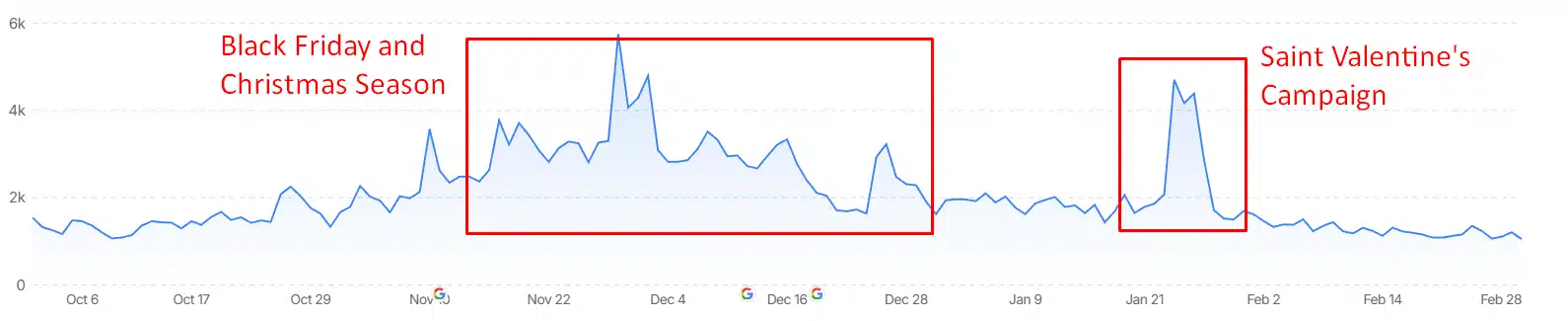
October often shows a drop below average while consumers are waiting for Black Friday deals. July is generally off-peak. If your year-over-year comparison pits February against the Christmas months, your “traffic drop” might be entirely normal seasonal variation.
In this case, use Google Trends to compare search interest for your primary keywords. If the entire category is down, that’s market demand, not site performance. Check whether competitors are experiencing similar patterns using tools like Semrush or SimilarWeb.
Site Migrations: Handle with Care
In my experience, platform migrations — Magento to Shopify, WooCommerce to BigCommerce, anything to anything — are the single most common source of catastrophic traffic loss.
The failure modes are predictable but still somehow repeated constantly. Missing or incorrect 301 redirects top the list. Every old URL needs to redirect to its new equivalent, and chains of multiple redirects bleed link value. Developers leave noindex tags from the staging environment. New platforms force different URL structures (Shopify mandates /products/ and /collections/ prefixes). Metadata gets lost or changed. Internal links still point to old URLs.
The migration recovery timeline follows a depressing curve: technical fixes typically show improvement within three to eight months, but full recovery often requires waiting for the next major algorithm update to validate your corrections.
Inventory Management Mistakes
When a product is discontinued, the instinct is to delete its page — but that’s almost always the wrong call. That product page accumulated backlinks, built ranking signals, and established topical authority. Deleting it throws all of that value away and creates 404 errors for anyone who bookmarked or linked to it.
The better approach depends on context. For temporarily out-of-stock products, keep the page live with clear messaging and email notification signup. Use schema markup to indicate availability status, and show related available products.
For permanently discontinued items, if a similar product exists, 301 redirect to the replacement. If the page has significant SEO value, keep it live with alternatives displayed. Only if the page has no traffic or backlinks should you consider removal.
Diagnosing Your Traffic Drop
A sudden traffic drop feels urgent, but reacting without a plan usually creates more problems than it solves. This step-by-step framework replaces guesswork with a clear diagnostic process, so you can quickly isolate the cause and focus on fixes that’ll make a difference.
First 24 hours: Validate that the issue isn’t tracking
- Check whether all channels dropped simultaneously
- Compare Search Console clicks to GA4 organic sessions
- Confirm tracking codes are present and consent banners aren’t blocking tags
Days 2-3: Segment the loss
- Separate branded vs. non-branded queries in Search Console
- Check performance by device, geography, and page type
- Verify in GA4 that the issue is truly organic, not channel-wide
Days 3-5: Check external factors
- Compare the drop against known algorithm updates
- Review competitor performance using third-party tools
Week 2: Deep technical audit
- Crawl the site for indexation issues, broken links, schema gaps, and CWV failures
- Review Coverage reports for “Discovered – currently not indexed” patterns
Week 3-4: Content assessment
- Review recently modified high-traffic pages
- Check for removed reviews, changed descriptions, or deleted product pages
Technical Audit Priorities for Recovery
Focus effort where impact is highest. For most ecommerce sites experiencing traffic drops, this is the priority order:
- Crawl budget and indexation come first. Fix faceted navigation bloat. Ensure sitemaps only include canonical URLs. Block low-value URL parameters in robots.txt. Address soft 404 errors that waste crawl budget.
- Mobile experience and Core Web Vitals come second. Mobile performance is still a weak spot for many retail brands. Hitting Google’s Core Web Vitals benchmarks — like loading main content within 2.5 seconds and avoiding layout shifts — becomes difficult once multiple third-party scripts enter the picture. Tools for chat, reviews, personalization, and payments often block the browser’s main thread long enough to noticeably delay interactivity.
- Structured data comes third. Verify Product schema includes all required properties. Check that availability status matches reality. Add ProductGroup schema for variants. Test with Google’s Rich Results Test.
- Content quality comes fourth. Audit thin product descriptions. Add or improve user-generated content. Build out buying guides and category-level content that demonstrates expertise.
Making Peace With Imperfect Measurement
The truth is, perfect conversion attribution is never coming back. The tracking accuracy of the 2010s was built on privacy practices that regulators and browser vendors have rightfully ended.
The practical response is focusing on what you can measure: first-party data through email signups and loyalty programs, server-side tracking, and incrementality testing that measures true lift instead of relying on last-click metrics that overstate impact.
Merchants with strong first-party data strategies see lower customer acquisition costs. This isn’t a nice-to-have anymore. It’s becoming the primary competitive advantage.
Prevention Beats Recovery
Traffic recovery is expensive and slow. Prevention is cheaper. Build these into your operations:
- Set up automated monitoring that alerts you to traffic drops within 24-48 hours. Don’t rely on monthly reports because by the time it shows a problem, you’ve lost weeks of revenue.
- Establish a change management process for anything touching URLs, page templates, or technical infrastructure. Document everything. Require SEO review before deployment.
- Monitor Core Web Vitals continuously. Performance degrades gradually as developers add scripts and plugins; catch the drift before it triggers ranking drops.
- Track your Merchant Center feed health weekly. Feed errors compound; a small data mismatch left unchecked becomes systemic.
- Keep an eye on your indexed pages count. Know how many pages Google should be indexing. When that number spikes or drops unexpectedly, investigate immediately.
When to Call for Backup
Diagnosing and recovering from ecommerce traffic drops requires overlapping expertise in technical SEO, content strategy, analytics, platform architecture, and competitive analysis. In other words, it requires experience and attention to detail.
Digital Commerce Partners specializes in Ecommerce SEO. Diagnosing why ecommerce traffic has dropped, building recovery plans, and implementing the technical and content changes that restore rankings is our day-to-day.
The ecommerce sites that thrive in 2026 and beyond will be the ones that treat organic traffic as the critical business asset it is: monitored obsessively, protected proactively, and recovered rapidly when something breaks.
Don’t let another week of revenue walk out the door while you wonder what went wrong.
